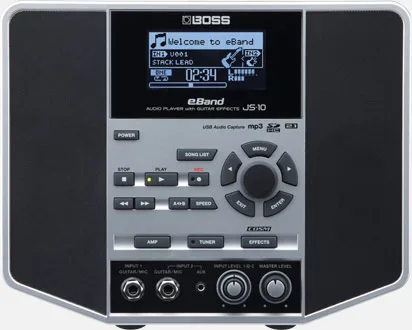


The Boss eBand JS-10 is an audio player with guitar effects from Boss, the guitar brand of Roland Corporation1. It is built around two independent input channels, each with its own effect and COSM amp paths, so you can plug in any dual combination of guitar, bass and/or microphone, and it plays back songs while you play along through the built-in effects2. An onboard 2.1 speaker system provides what Boss describes as rich, full-frequency sound for song playback and the built-in effects and COSM amps2.
USB flash drives
The JS-10 accepts third-party USB flash drives in place of the Roland M-UF2G, with a capacity of up to 32 GB5. Boss gives a few conditions worth knowing before you rely on one:
- Format the USB flash drive on the JS-10 itself before use; some devices lack a built-in formatting feature, in which case the media must be formatted on a computer first5.
- Avoid off-brand or low-price USB flash drives5.
- Depending on the drive, it might fail to perform adequately, and correct recording or playback or both might become impossible5.
Boss does not guarantee every drive will work. A drive that passes the 32 GB limit, or one that is off-brand or low-price, may fail to record or play back correctly5.
USB drivers and computer connections
A compatible audio driver is available for the JS-103. To use any of these drivers, the USB MODE of the JS-10 must be set to "AUDIO"467.
| Driver | System | Notes |
|---|---|---|
| Driver Ver.1.0.1 for Windows 10/11 | Windows 10/11 | Released 2023/05; adds support for Windows 11671 |
| Driver Ver 1.0.1 for Windows 8/8.1 | Windows 8/8.1 | Works incorrectly when connected to a USB 3.0 port1 |
| Driver Ver.1.0.4 for macOS 10.15 | macOS 10.15 | Requires an Apple Mac series computer with on-board USB41 |
| Driver Ver.1.0.6 | macOS Sonoma 14.x and later | Latest macOS driver81 |
| Driver Ver.1.0.0 | OS X 10.8 | Driver for using the JS-10 on OS X 10.8716 |
A few points from Boss's driver pages apply across versions:
- Mac computers running Microsoft Windows are not supported478.
- For the macOS 10.15 and OS X 10.8 drivers, connecting to a USB 3.0 port does not change the product's performance46. The Windows 8/8.1 driver is the exception: it works incorrectly on a USB 3.0 port1.
- The Windows drivers require a Windows-compatible PC equipped with a USB port1.
- The driver license from Roland Corporation permits use on a specific single computer at one time, with one backup copy allowed, and the agreement is governed by the laws of the State of California41.
Firmware and system program updates
The latest system program for the JS-10 is Ver.1.10, released in November 20249. It changed the default value for the AUTO OFF setting to 20 minutes9. An earlier system program, Ver.1.01, was released in April 20139.
Checking your version
Hold down the EXIT and ENTER buttons and press the POWER button; the display shows the current version at "VERSION:"9. If it shows version 1.10 or later, there is no need to update9.
Updating the system program
The update requires an SD card formatted on the JS-10 and an SD card reader or a PC with an SD card slot, on Windows or Mac9. The Ver.1.10 archive, "js10_sys_v110.zip", contains three update files: "_BOOTPRG.ES_", "_JS10PRG.JS_" and "_UPDINFO.JS_"9.
- Format the SD card on the JS-109.
- Copy the three update files from the archive onto the card9.
- Insert the card into the SD CARD slot9.
- Hold down the REC and STOP buttons and switch on the power9.
If a power failure or similar accident occurs during the update process, the JS-10 will not be able to start up in normal operating mode and will require service at a Roland service center9. Do not power off the unit while the update is running.
Videos
Sweetwater
Guitar World
BOSSchannel
Questions
What size USB flash drive works with the Boss eBand JS-10?
Boss specifies a USB flash drive with a capacity of up to 32 GB. Third-party drives can be used in place of the Roland M-UF2G, but Boss advises avoiding off-brand or low-price drives, since some may fail to record or play back correctly. Format the drive on the JS-10 itself before use.
How do you check the firmware version on the eBand JS-10?
Hold down the EXIT and ENTER buttons and press the POWER button. The display shows the current version at "VERSION:". If it shows version 1.10 or later, the system program is up to date and no update is needed.
Does the eBand JS-10 have a built-in speaker?
Yes. The JS-10 has an onboard 2.1 speaker system that Boss describes as providing rich, full-frequency sound for song playback and for the built-in effects and COSM amps.
Can the eBand JS-10 take two inputs at once?
Yes. It provides two independent input channels, each with its own effect and COSM amp paths. You can plug in any dual combination of guitar, bass and/or microphone.
Does the eBand JS-10 work with macOS?
Yes. Boss provides drivers for macOS, including Driver Ver.1.0.4 for macOS 10.15 and Driver Ver.1.0.6 for macOS Sonoma 14.x and later. The computer needs on-board USB, and Mac computers running Microsoft Windows are not supported.
What does the AUTO OFF setting do on the eBand JS-10?
AUTO OFF controls how long the unit waits before powering itself down. With system program Ver.1.10, released in November 2024, the default value for AUTO OFF was changed to 20 minutes.
Sources (9)
- BOSS - Support - eBand JS-10 - Updates & Drivers, BOSS (boss.info)
- BOSS - eBand JS-10 | Audio Player with Guitar Effects, Boss
- BOSS - Support - Support News - Compatibility with macOS High Sierra (10.13), Boss (boss.info)
- BOSS - Support - eBand JS-10 - Updates & Drivers, Boss (boss.info)
- BOSS - Support - eBand JS-10 - Support Documents, Boss (boss.info)
- BOSS - Support - eBand JS-10 - Updates & Drivers, BOSS (boss.info)
- BOSS - Support - eBand JS-10 - Updates & Drivers, BOSS (boss.info), 2023
- BOSS - Support - eBand JS-10 - Updates & Drivers, boss.info
- BOSS - Support - eBand JS-10 - Updates & Drivers, BOSS (boss.info), 2024-11