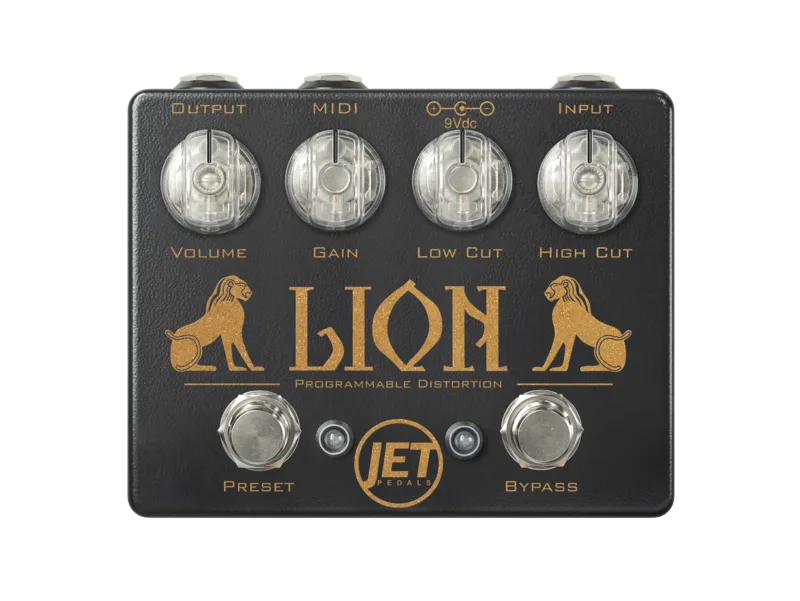


What makes the Lion stand out from a plain three-knob distortion is its three selectable clipping circuits, named Cyan, White and Yellow, its preset system, and an internal 18V charge pump that runs the analog circuit at higher voltage than the 9V supply feeding it12.
Three clipping circuits: Cyan, White and Yellow
The Lion's core sound comes from three distortion circuits you can switch between, each using a different clipping arrangement1:
| Circuit | Clipping components |
|---|---|
| Cyan | Symmetrical silicone diodes1 |
| White | Asymmetrical silicone diodes1 |
| Yellow | Red LEDs1 |
The differences matter to how the pedal feels. Delicious Audio notes that the Lion loads up by default with the symmetrical silicone diode circuit, "which offers the most amount of compression," suited to heavy thick chording or saturated lead lines2. Asymmetrical clipping in the White circuit and the higher forward voltage of red LEDs in the Yellow circuit give the player two other characters to choose from without touching the knobs.
Controls
The pedal keeps its control surface simple, with four knobs and two footswitches1:
| Control | What it does |
|---|---|
| Volume | Sets the overall output volume1 |
| Gain | Sets the amount of gain and breakup1 |
| Low Cut | Adds or removes low frequencies1 |
| High Cut | Post-gain high frequency roll-off; counter-clockwise lets more highs through, clockwise removes them1 |
Because the High Cut circuit sits after the gain stage, it shapes the presence of the distorted signal rather than the signal going into the clipping, which lets you fine tune the overall presence of your sound1. The Preset switch does several jobs: tap it to activate Preset Mode, press and hold for half a second to cycle through presets, and double-press to activate the Lead Boost1.
Presets and MIDI control
The Lion runs in two modes. In Live Mode the knobs are always active and you play it like a conventional pedal; in Preset Mode the knobs are inactive and the pedal recalls stored settings, with quick access between the two2. The manual describes the workflow: while in Live Mode, select your desired algorithm and set all the knobs to their desired positions before a CC Snapshot is taken4.
- 3 selectable onboard presets, with knobs inactive in preset mode1
- 100 onboard presets available with the use of a MIDI controller, with any circuit savable to any preset location2
- Full MIDI control over every knob, switch and feature2
A practical detail for preset users: the Gain and Tone knobs do not have illuminated knobs, so the Preset and Bypass LEDs flash when a knob is moved away from its saved position and return solid when it is back at the saved preset location4.
Changing the MIDI channel
From the factory the Lion receives MIDI messages on channel 1, and this can be changed on startup4:
- Apply power and hold down the Preset switch while the pedal is in startup mode, with the Volume and High Cut knobs at their startup positions4
- The Bypass LED flashes the current channel number4
- Press the Bypass switch to increment the channel by 1; channels run 1 through 16, and after 16 the count starts over4
- Release the Preset switch to save4
Lead Boost
Double tapping the Preset footswitch engages an instant Lead Boost. The boost level is user definable from 1 to 4, with a factory default of 1, and the chosen level can be stored in permanent memory through the startup configuration menu's Lead Boost level setting2. For players who want a dedicated volume jump for solos, this puts a simple boost inside the pedal itself.
Power: 9V, 200mA, with an 18V charge pump
The Lion runs on a 9V DC supply with a negative tip, which is not included, and JET Pedals states it requires 200mA or larger, warning that lower power may cause performance issues1. RockBoard's listing gives the same figures: 9V DC, center negative, 200mA5.
The 200mA requirement is well above what a typical analog distortion pedal draws, so a small or shared power tap may not be enough. JET Pedals says lower power may cause performance issues1.
Inside, the pedal converts that 9V input to 18V with an internal charge pump, which Delicious Audio describes as delivering "maximum headroom and responsive touch dynamics"2. JET Pedals credits the internal 18V conversion with the pedal's high headroom and dynamic response1.
The circuit behind it
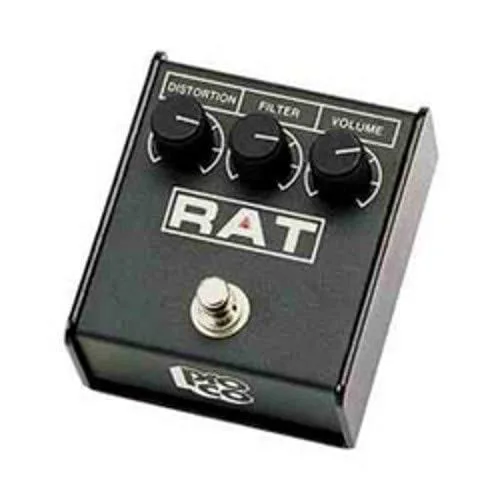
The Lion is an op amp based distortion with hard clipping diodes placed after the feedback loop of the op amp15. That topology places it in the same family as some of the most widely played distortion circuits. JET Pedals says its tone is "inspired by classic circuits like" the Boss DS-1, Pro Co RAT and JHS Angry Charlie1, and RockBoard's listing likewise calls it closely comparable to those circuits while emphasizing that "it is its own unique circuit"5. Delicious Audio describes it as a RAT-style distortion in the same breath as noting it is its own circuit2.
So it is not a RAT clone, but a player comparing them will find the same broad recipe: an op amp gain stage with diodes clipping the signal after the feedback loop, a filter to shape the result, and enough gain range to go from grit to saturated lead. The Lion's differences are the three switchable clipping circuits, the preset and MIDI layer, and the 18V internal headroom215.
Videos
JET Pedals
shnobel
Hey Worship Leader
Questions
Is the Jet Pedals Lion analog?
Yes, in its audio path. JET Pedals describes the Lion as a 100% all analog signal path distortion pedal, with a digital side that handles presets and MIDI control. Delicious Audio places it in the family of modern overdrives and distortions with an analog path and a digital brain, so the sound itself stays analog while the switching and storage are digital.
Is the Jet Pedals Lion like a RAT?
It is related but not a clone. JET Pedals says the Lion's tone is inspired by classic circuits like the Boss DS-1, Pro Co RAT and JHS Angry Charlie, and it is an op amp based distortion with hard clipping diodes placed after the feedback loop, a topology in the same family. Both JET Pedals and RockBoard state it is its own unique circuit.
How do you change the MIDI channel on the Jet Lion?
From the factory the Lion receives MIDI on channel 1. To change it, apply power, then hold the Preset switch during startup while the Bypass LED flashes the current channel number. Press the Bypass switch to increment the channel by 1, cycling through channels 1 to 16, then release the Preset switch to save.
Does the Lion have a lead boost?
Yes. Double tapping the Preset switch engages an instant Lead Boost. The boost level is user definable from 1 to 4, with a factory default of 1, and it can be stored in permanent memory through the startup configuration menu's Lead Boost level setting.
Is the Jet Pedals Lion true bypass?
JET Pedals lists true bypass switching for the Lion, to preserve your core tone. Delicious Audio's product page describes the bypass switches as soft click, so the pedal engages without a hard mechanical stomp feel while still keeping the bypassed signal path out of the circuit.
Sources (5)
- Lion Distortion, JET Pedals
- Jet Pedals Lion Distortion, Delicious Audio, 2022-01-18
- Powerhouse Set, JET Pedals
- Voes | MIDI-CC, Voes (voes.be), 2024
- Lion Distortion (Black) by JET Pedals, RockBoard PedalPedia, 2026