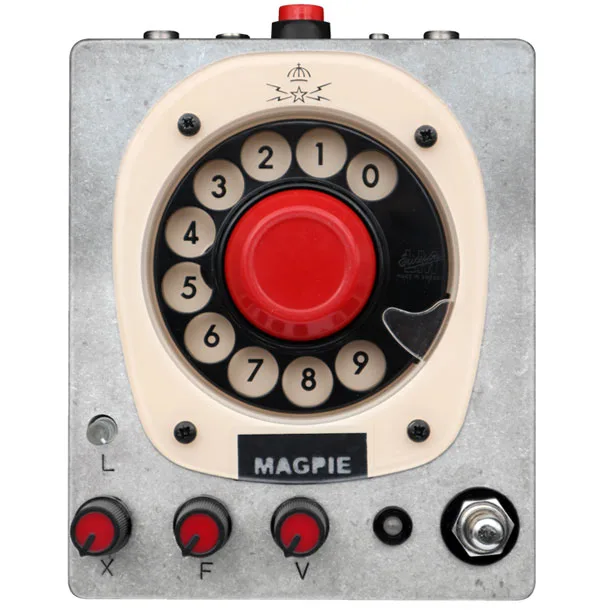


The Magpie Pedals Stutterphone V2 is a kill switch pedal built around a vintage rotary phone dial: you cut your signal by pressing the big red button in the center of the dial, or by dialing a number, which generates a short square tremolo style stutter until the dial returns to its original position. Alongside the kill switch it carries a fuzz and a "silence looper" that records moments of quiet rather than audio, and it can sync its loop to an external clock. Delicious Audio's Paolo De Gregorio called it "a stunning pedal that embeds a vintage rotary phone dial" when the V2 was introduced in February 20231.
The idea goes back to one of Simon the Magpie's oldest pedal concepts: taking apart vintage rotary phones and simply passing the guitar signal through the inside mechanics, using both the rotary dial and the big red button as kill switches1. Delicious Audio's later buying guide describes it as "a kill switch + fuzz that cuts the signal either by pressing the big red button in the center or by dialing a number"2.
How the kill switch works
In the V2 the signal is never mechanically broken. Instead, the rotary dial and big red button are connected to a microcontroller that drives a designed "silencer", which avoids the pop sounds you get from mechanically cutting an audio signal. The result, according to De Gregorio, is a stutter "sounding smoother and not as glitchy and noisy as it did in the original, where it was generated mechanically by the analog signal passing through the phone's contacts"1.
The pedal has two modes of operation, changed by pressing and holding the bypass footswitch for about 1 to 2 seconds1:
- Red Mode (Manual/Original): the pedal always starts here when powering up. You use the big red button or the rotary dial to silence the signal or let it pass through.
- Green Mode (Loop Mode): holding the footswitch for about a second turns the pedal's light green and engages the looper.
A red button on the back inverts the function of the microcontroller: the pedal is set to silent and only lets audio through on button presses. In this reverse mode the pedal stays silent until the big red button is pressed, or passes stuttering audio while the rotary dial is spinning. The inversion also applies in Loop Mode1.
The silence looper
Green Mode is what Magpie calls a silence looper: rather than recording your playing, it records the rhythm of the kill switch pattern, the silence input through the large red button. "It loops the silence!" as De Gregorio puts it, which allows the creation of rhythmic patterns that can be reset by holding the red button for a second or so1.
In loop mode you can record up to 10 moments of silence and signal on a constant loop. The moments can range in time, but they can only be recorded with the big red button, not the rotary dial1. Loop length is controlled with the transparent LED knob on the left of the pedal, and the green light turns orange whenever the loop starts a new cycle1. For more on this family of effects, see Looping Pedals.
Clock input and syncing
The Stutterphone can be synced to external devices, such as an arpeggiator's clock source, via a 5V cable connection. When synced, dialing a number skips that many steps in the sequence1. Specifically, a 5V CV clock connected to the 3.5mm jack on the back controls the loop length: with a clock source connected, the rotary dial skips steps, with the microcontroller disregarding the dialed number of clock steps before restarting the loop1.
The fuzz
For the first official Magpie Pedals Stutterphone, Simon also designed a fuzz, and that circuit is included in the V2, with an added clean mix and a volume knob tweaked to double as a clean boost1. The fuzz controls:
| Control | What it does |
|---|---|
| X knob | Blend of clean and fuzzed up signal, introducing the fuzz1 |
| F knob | Mixes two fuzzes, a darker and a sharper fuzz1 |
| V knob | Sets the pedal's output level, tweaked to double as a clean boost1 |
If you are comparing this against more conventional dirt pedals, see Fuzz Pedals, and the stutter effect itself sits close to what Tremolo Pedals do, though here it is triggered by hand rather than by an internal oscillator.
Videos
Guy Incognito
KDH
Questions
What does the Magpie Pedals Stutterphone V2 do?
It is a kill switch and fuzz pedal built around a vintage rotary phone dial. Pressing the big red button in the center of the dial cuts the signal, and dialing a number generates a short square tremolo style stutter until the dial returns to its original position. It also has a loop mode that records moments of silence rather than audio, so you can build rhythmic kill switch patterns.
What is the difference between Red Mode and Green Mode on the Stutterphone V2?
Red Mode is the manual mode the pedal always starts in when powering up: you silence or pass the signal yourself with the big red button or the rotary dial. Holding the footswitch for about a second turns on Green Mode, also called Loop Mode, which records up to 10 moments of silence and signal on a constant loop, letting the pedal repeat your kill switch rhythm for you.
Can the Stutterphone V2 sync to an external clock?
Yes. A 5V CV clock connected to the 3.5mm jack on the back controls the loop length, which lets the pedal sync to external devices such as an arpeggiator's clock source. With a clock source connected, dialing a number skips that many clock steps before the loop restarts.
How is the Stutterphone V2 different from the original?
In the V2 the signal is never mechanically broken. The rotary dial and big red button feed a microcontroller that drives a designed silencer circuit, so the stutter sounds smoother and not as glitchy and noisy as the original, where the effect was generated mechanically by the analog signal passing through the phone's contacts.
Does the Stutterphone V2 have a fuzz?
Yes. It includes the fuzz designed for the first official Magpie Pedals Stutterphone. The X knob blends clean and fuzzed up signal to introduce the fuzz, the F knob mixes a darker and a sharper fuzz, and the V knob sets output level and is tweaked to double as a clean boost.
Sources (2)
- Simon The Magpie Stutterphone V2: The Silence Looper, Delicious Audio, 2023-02-14
- The Best Glitch, Stutter And Granular Pedals In 2024, Delicious Audio, 2024-05-27