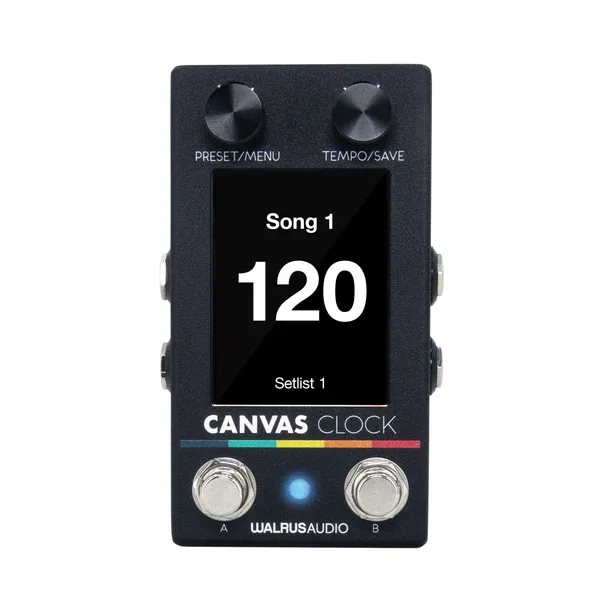


The Walrus Audio Canvas Clock is a compact MIDI utility pedal that acts as an all-in-one tempo solution for a pedalboard. It keeps every time-based device on the board locked to one BPM, sending MIDI clock and analog clock at the same time, so a delay with a MIDI port and a tremolo that only takes a tap input can both follow the same tempo1. Walrus Audio announced it on 25 February 2025, priced from $299.9921.
On the front it carries a large, crisp screen that shows the tempo in letters big enough to read from across a dark club stage, along with a Tempo/Save encoder and switch and two footswitches3. It is a digital pedal4, and because it passes no guitar signal there is no bypass to speak of; Guitar World's review lists its bypass as "N/A"3.
The four assignable jacks
The heart of the Clock is its four 1/4 inch jacks (TS or TRS), and they are not just for sending tempo. Each can be assigned one of four functions5:
| Jack function | What it does |
|---|---|
| Tempo Out | Connects to any pedal or device that accepts external tap inputs or analog time controls, for example Walrus Audio's Arp-87 delay5 |
| CV Out | Controls any device that accepts control voltage, such as analog synths or drum machines1 |
| Switch Input | Receives input from two external footswitch controls connected to the Tip (left) and Ring (right), assignable to many functions, with more options possible via software update5 |
| Expression In | Accepts an expression pedal and sends a MIDI CC message out to a connected pedal, with adjustable Toe Down and Heel Down values1 |
Because the jacks are assignable, the Clock can reach pedals that have no MIDI at all. Bass Magazine's launch coverage noted that tempo out, CV out, switch input and expression in can each be assigned to any of the four jacks2. Guitar World's reviewer, Alex Lynnam, pointed out that each jack can send tempo out as analog or MIDI, control voltage, or switch/expression in, which makes the Clock a hub for non-MIDI gear as well as MIDI gear3.
Songs, setlists and MIDI macros
The Clock stores 128 "Song" slots, each an editable preset holding a song name, meter, BPM, MIDI macros and a metronome start or stop setting1. Songs can be grouped into setlists, and the two footswitches, A and B, are customizable. Each can be assigned one of these onboard functions1:
- Advance to the next song
- Go back to the previous song
- Advance to the next setlist
- Go back to the previous setlist
- Toggle the metronome start and stop
- Global tap tempo
The MIDI macro system is what turns a song change into a full board change. As Guitar World's reviewer explained, 128 macros are available with 15 messages per macro, meaning song changes can turn pedals on and off and switch presets across the board3. For a player running a setlist from one box, that combines tempo, meter and preset control in a single step.
Metronome, sync and expression
The metronome is audible through the Met Out port, a 1/8 inch TRS output whose signal can be sent to a front of house console or a monitor. Metronome type, volume and accent note are all edited in the Metronome Menu1.
The Met Out port is not intended to drive headphones. Walrus Audio says to plug it into a high impedance input1.
The Sync jack (1/8 inch TRS, in and out) handles clock to and from external devices. Walrus Audio included the option to send or receive a 1x or 2x signal for devices whose clock signals are double the standard timing signals, and users can determine the subdivision of the BPM sent out1. Guitar World's reviewer found the sync out can be used for external devices like Eurorack, and it can send CV for synths; there are also inputs for accepting BPM from an external source via the sync jack3.
MIDI itself runs over both 1/8 inch TRS and 5-pin DIN ports, with In and Out on both1. An expression pedal plugged into an assigned jack sends MIDI CC messages out to a connected pedal1.
Editing and the web editor
All the functionality is available from the pedal itself, but the Clock also has a web editor, reached by hooking it up to a computer via USB-C for an easier editing experience3. The editor requires the Chrome browser on Windows or Mac OS, and it is where firmware updates arrive when available; Walrus Audio hosts it at walrusaudio.io5.
Guitar World's review praised this side of the pedal, listing a great user interface among its pluses3.
Power and connections
The Clock runs on 9V DC at 300mA, center negative with a 2.1mm center pin, or it can be powered via USB-C1. Walrus Audio recommends an isolated power supply for its pedals and does not recommend daisy chain supplies; no power supply is included1.
At 300mA the Clock draws more than a typical analog stompbox, so plan a power brick with headroom rather than a small daisy chain.
To keep the small form factor, the MIDI ports and power jack are directly soldered to the boards inside, which leaves a small gap between the connectors and the edge of the enclosure3.
The full connection list1:
- Inputs: 1/4 inch Jacks 1 to 4 (TS or TRS), MIDI In (5-pin DIN), MIDI In (1/8 inch TRS), Sync In (1/8 inch TRS), USB-C
- Outputs: 1/4 inch Jacks 1 to 4 (TS or TRS), MIDI Out (5-pin DIN), MIDI Out (1/8 inch TRS), Sync Out (1/8 inch TRS), Met Out (1/8 inch TRS), USB-C
Versions and pricing
The Canvas Clock launched at $2991. A blemished version has been sold at $254.99, where the blemish is cosmetic only, such as scratches or dents in the finish1. Walrus Audio has also issued a limited batch Harvest Series edition of the full Canvas lineup, including the Clock, with a warm white enclosure and new fonts and colors; the Harvest Series blemished listing has since sold out5.
Guitar World's review gave the launch price as $299 / £299 / €3493.
What reviewers said
Guitar World's Alex Lynnam reviewed the Clock and highlighted its display and interface: on the front it has a huge, crisp screen and a nice understated colourway, with the tempo shown in large letters clear at a glance3. The review's plus points included the great user interface3, and the reviewer noted the assignable jacks and macro system as the pedal's core strengths for players running MIDI and non-MIDI boards together3.
Videos
walrusaudioeffects
Mark Johnston
Michael W. Westbrook
Questions
Can the Canvas Clock sync pedals that don't have MIDI?
Yes. Each of the four 1/4 inch jacks can be assigned a Tempo Out function, sending an analog clock or tap signal to any pedal that accepts external tap inputs or analog time controls. The Clock can send analog clock and MIDI clock at the same time, so MIDI pedals and tap-only pedals can both stay in sync.
Can the Canvas Clock be powered by USB-C?
Yes. The Clock runs on a 9V DC center-negative supply with a 2.1mm center pin, drawing 300mA, or it can be powered over USB-C. Walrus Audio recommends an isolated power supply and does not recommend daisy chain supplies. No power supply is included.
Does the Canvas Clock have a metronome output for in-ear monitors?
It has a Met Out port on a 1/8 inch TRS cable that can send the metronome signal to a front of house console or a monitor, with editable type, volume and accent note. It is not intended to drive headphones directly, so it should be plugged into a high impedance input.
How many songs can the Canvas Clock store?
There are 128 Song slots, each an editable preset holding a song name, meter, BPM, MIDI macros and a metronome start or stop setting. Songs can be grouped into setlists, and the two footswitches can be assigned to move forward or back through songs and setlists.
What browser does the Canvas editor need?
The Canvas web editor requires the Chrome browser on Windows or Mac OS, and it is accessed at walrusaudio.io over USB-C. The same connection handles firmware updates when they are available. All functionality is also editable from the pedal itself.
Sources (5)
- Canvas Clock, Walrus Audio
- Walrus Audio Releases The Canvas Clock Tempo Control Device, Bass Magazine, 2025-02-25
- "The ability to use this as a midweight MIDI brain for a gigging setup is what makes it unique.": Walrus Audio Canvas Clock review, Guitar World, 2025-04-21
- Canvas Clock by Walrus Audio, RockBoard PedalPedia, 2026
- Canvas Clock, Walrus Audio