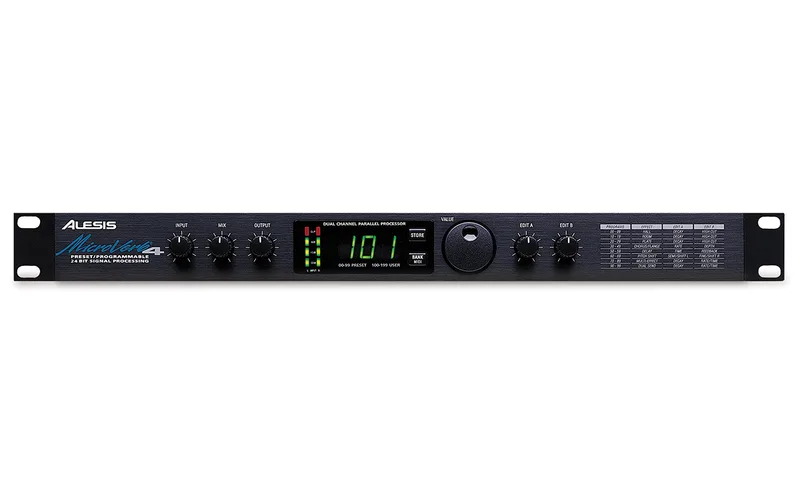


The Alesis MicroVerb 4 is a rack-mounted multieffects processor that Alesis designed to provide "a wide variety of great-sounding, easy-to-use effects for small studios, engineers and performing musicians"1. It is a discontinued unit, so everything about it today is on the secondhand market, but Alesis still hosts its manual and program chart. For a guitar player, it is a compact way to add reverb, delay, chorus, flanger, pitch shifting and rotary-style Lezlie effects from one box, with up to three effects running at once1.
The unit offers 200 programs in total: 100 factory presets numbered 00 to 99, and 100 user program slots numbered 100 to 199 that you can edit and store your own settings in21. Conversion is 18-bit, which Alesis describes as "pro-grade 18-bit A-to-D and D-to-A processing"1.
The effects and factory programs
The MicroVerb 4 covers six effect families: reverb, chorus/flange, delay, pitch shifting, Lezlie, and dual send effects that combine Reverb/Delay, Reverb/Chorus or Reverb/Flange2. The reverb side includes Concert Hall programs (00 to 09 and 100 to 109), a simulation of a large concert hall, and Plate Reverb programs (20 to 29 and 120 to 129) that simulate a classic 4' by 8' echo plate, a suspended sheet of metal with transducers at either end, which the manual notes is prized for transparent sound on vocals and guitars2.
The delay side has several subtypes. Mono Delay provides up to 1270 ms, adjustable in 10 ms increments. Stereo Delay provides two separate delays adjustable in 5 ms increments. Ping Pong Delay bounces the output left to right, adjustable in 5 ms increments with feedback from 0 to 99%. MultiTap Delay is described in the manual as "like having three delays at once," usually arranged in a rhythmic pattern2.
Pitch shifting offers a Stereo Pitch Shifter whose Semi parameter (Edit A) shifts pitch in half-step increments across a range of up or down one octave, while Fine (Edit B) detunes up or down one half step2. The chorus family includes True Stereo Choruses, which use individual LFOs controlling the left and right sides at different rates for a wider stereo image than regular stereo chorus2.
The program chart gives a one-line description of every program. A sample of what is in there:
| Program | Description |
|---|---|
| 00 | All-purpose concert hall, great for vocals |
| 03 | Big, dark, scary castle reverb |
| 07 | Parking garage reverb with lots of high damping |
| 20 | Studio goldfoil plate reverb |
| 37 | Classic stereo chorus |
| 46 | Slow flange for grungy bass |
| 50 | True stereo offset delay |
| 59 | Tape echo, repeats get darker as they decay |
| 62 | 5th and 9th harmony for leads |
| 70 | Fast rock lezlie program (set Mix 100% wet) |
| 149 | Medium speed surf guitar tremolo (set Mix 100% wet) |
| 172 | Authentic lezlie speaker into a small room (100% wet) |
Several programs are aimed squarely at guitar: the slow flange for grungy bass, the surf guitar tremolo, the 5th and 9th harmony for leads, and the Lezlie programs that emulate a rotary speaker. A few programs, including the auto pan and tremolo types, are marked to be used with the mix set 100% wet; the manual explains that with Auto Pan the unit "should have its effects mix 100% wet with no direct signal mixed in" to avoid phase problems2.
Controls on the front panel
The front panel is built around a small set of knobs rather than deep menu diving. The manual describes each control's job:
| Control | What it does |
|---|---|
| Input Level | Controls the level of the signal being fed into the unit |
| Mix Level | Controls the balance between the uneffected signal and the effects |
| Output Level | Controls the output volume; the manual calls 75% the optimum level |
| Value Knob | Changes programs; with Bank/MIDI held, it changes the MIDI channel |
| Edit A / Edit B | Adjust aspects of the currently selected program, such as reverb decay or pitch |
For reverb programs, Edit A sets the Reverb Decay, which determines how long the reverb sounds before it dies away, with the display showing the decay time in seconds and milliseconds2. A 4-segment LED on the panel gives overload warning so you can see when the input is too hot1. The wet/dry mix is programmable and stored with each program1.
Using it with guitar in mono or stereo
The MicroVerb 4 has two 1/4" unbalanced inputs and two 1/4" unbalanced outputs, LEFT and RIGHT2. The manual describes four hookup options: Mono In/Mono Out, Mono In/Stereo Out, Dual Mono, and Stereo. Dual Mono allows discrete processing of the two channels, since some of the effects are discrete stereo to maintain stereo imaging2.
For a guitar player, the practical choices are Mono In/Stereo Out, which spreads a chorus, flanger or ping pong delay across two amps, and plain Mono In/Mono Out for a single amp. Programs like the true stereo offset delay (50) and the wide 500ms stereo delay (159) are built around that two-output setup3.
Footswitch, bypass and MIDI
The rear panel has a 1/4" stereo phone jack for footswitches. It accepts one or two momentary, not latching, footswitches, either normally-open or normally-closed. The tip connection is Bypass and the ring is Control2.
The Mix Level knob controls the balance between the uneffected signal coming through the inputs and the effects being generated2. Turned fully toward the dry side, the unit passes the uneffected signal; turned the other way, the effects dominate. The wet/dry/mix balance is programmable, so it is stored as part of each program rather than set once and left alone1.
MIDI support is broad for a unit of this vintage. The MicroVerb 4 recalls programs via MIDI program change messages, accepts realtime parameter modulation from MIDI controllers, handles SysEx dumps of individual programs or the entire bank, and passes MIDI thru. It supports two simultaneous MIDI controls12.
Power and support
The reference manual remains available from Alesis as a PDF download1. Support coverage has a regional limit: the Alesis Limited Warranty applies only to products sold to users in the USA and Canada2, so a unit bought elsewhere falls outside that coverage.
The MicroVerb 4 is discontinued1. The Alesis Limited Warranty applied only to products sold to users in the USA and Canada, and the manual's support contact (Alesis Product Support, 3630 Holdrege Avenue, Los Angeles, CA 90016, 1-310-841-2272) dates from the unit's era, so check current Alesis contact details for any service question2.
Where it came from
The MicroVerb 4 is part of Alesis's line of rackmount signal processors, and its reference manual and program chart are still published by Alesis1. The program chart documents the full bank of presets, from Concert Hall reverb programs 00-09 through user program 100, a large, bright hall described as perfect for piano32.
The preset chart shows how the MicroVerb 4's programs were voiced for specific uses: program 03 is a big, dark, scary castle reverb, program 23 a bright, dense vocal plate, and program 59 a tape echo whose repeats get darker as they decay3. Delay programs include a 255ms ping pong delay the chart suggests trying with tap tempo, and program 98 pairs a bright hall with a 1/4 note delay at 108bpm3.
Videos
FarewellOldFriends
Paul Graham (Guitar)
Reverb
Questions
Is the Alesis MicroVerb 4 discontinued?
Yes. Alesis lists the MicroVerb 4 as discontinued on its product page. The unit was part of a line of affordable rack processors, and the program chart documentation carries a 1999 copyright, so it has been out of production for a long time. Units today are found on the used market, and the manual and program chart are still available from Alesis.
What power adapter does the MicroVerb 4 use?
It runs on a 9 Volt power transformer, the Alesis P3, rather than batteries or a standard pedalboard supply. The manual notes the shipped adapter matches the voltage of the country of sale, either 110 or 220V at 50 or 60 Hz. If you buy a used unit, make sure it comes with the correct adapter for your mains voltage.
Can you use a footswitch with the MicroVerb 4?
Yes. The rear-panel footswitch jack is a 1/4 inch stereo phone jack that accepts one or two momentary, not latching, footswitches, either normally-open or normally-closed. The tip connection gives Bypass and the ring gives Control, so a single stereo footswitch can handle both functions.
How do you bypass the MicroVerb 4?
Bypass mode toggles the effects off. You can reach it by turning the Mix knob fully left, or by connecting a momentary footswitch to the footswitch jack and pressing it. When bypass is active, the display reads bYP, so you can confirm the state at a glance on a dark stage.
What is the maximum delay time on the MicroVerb 4?
Alesis lists the maximum delay time as 1,300 ms. Within the delay programs, Mono Delay provides up to 1270 ms adjusted in 10 ms increments, while Stereo Delay gives two separate delays adjusted in 5 ms increments. Ping Pong Delay is also adjustable in 5 ms steps with feedback from 0 to 99%.
Sources (3)
- Alesis MicroVerb 4, Alesis, 2026
- MICROVERB 4 TABLE OF CONTENTS, Alesis, 2025
- Subject:, Alesis Corporation, 1999-04