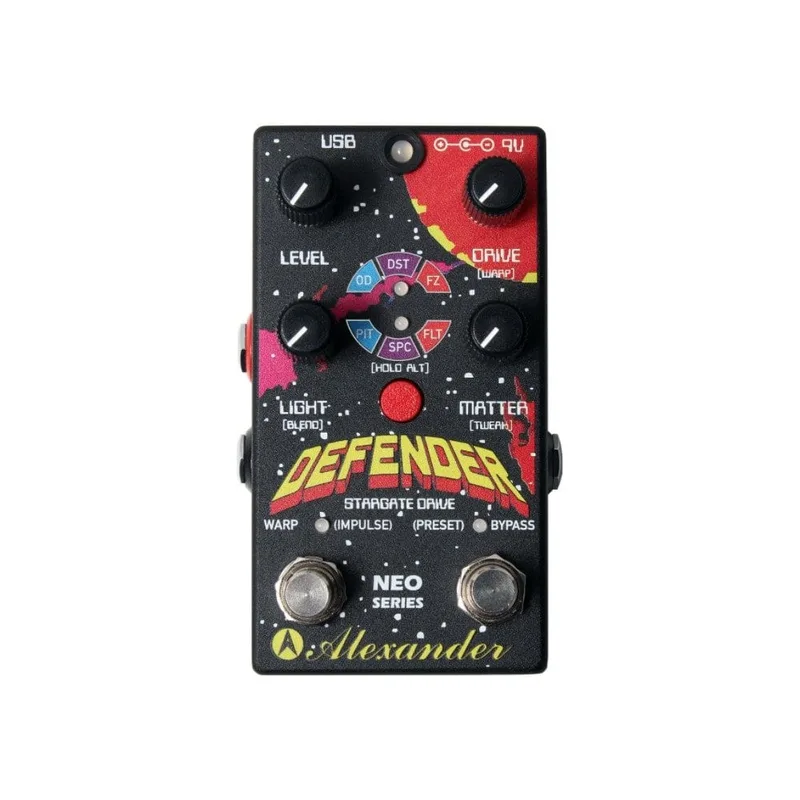


The Alexander Pedals Defender, also written up as the Defender Stargate Drive, is a digital dirt pedal that packs overdrive, distortion and fuzz circuits into one box, then lets you filter any of them through octave shifting, space modulation or a resonant lowpass filter1. It is the newest addition to Alexander Pedals' Neo Series, a line of digital pedals with presets, MIDI and expression control, and it is fully compatible with the rest of that series2. Premier Guitar described it as "a unique pedal with multiple digital drives ranging from subtle to massive digital fuzz paired with a full control panel of secondary effects"2.
The look is deliberately retro: Gearnews called it "this little '80s retro looking box of noise," with arcade-game styling and a big red button labeled Hold/Alt3. It is aimed squarely at experimental players. Gearnews' reviewer wrote that "It sounds either amazing or atrocious, depending on your outlook on weird boxes of noise and how you set it up to work," and concluded it is one for the more experimental musician3.
What it is and what it does
The Defender gives you three distortion modes, selected with the Select button and shown on the upper LED1. Delicious Audio describes each in a line:
| Mode | What it does |
|---|---|
| OD | Overdrive1 |
| DST | Distortion with a darker, smoother tone1 |
| FZ | Splattery, sizzly fuzz tone1 |
On top of the dirt you add one of three special effects, and any distortion effect may be combined with any special effect1:
| Special effect | What it does |
|---|---|
| PIT | Polyphonic octave shifting, applied to the distortion signal only; Tweak adjusts the blend between octave down, distortion and octave up1 |
| SPC | Space modulation using a short time delay on the distortion signal; Tweak controls the delay time from zero to a short slap-back1 |
| FLT | Super-tweakable resonant lowpass filter, ideal for synth or wah textures; Light controls cutoff, Matter controls resonance, Tweak mixes filtered and unfiltered sound1 |
Gearnews lists the selectable effect types as Overdrive, Distortion, Fuzz, Octaver, Modulation or Filter, tweaked with the four knobs3. The pedal is not guitar-only: Gearnews describes it as "a pedal for guitar or synths that can be used to manipulate the sounds in a variety of weird and whacky ways"3.
The controls
The four knobs are labeled Level, Drive (Warp), Light (Blend) and Matter (tweak)3. Three of the four knobs have alternate functions, accessible while holding the red Alt button, and those alternate functions vary depending on the selected effect1.
| Control | Primary function |
|---|---|
| LEVEL | Adjusts the overall output level; the pedal has quite a bit of volume on tap, enough to overdrive your amp1 |
| DRIVE | Controls the amount of drive, saturation and distortion of the effect1 |
| BLEND (Light) | Mixes the clean signal (fully counter-clockwise) with the distorted signal (fully clockwise); useful for bass or low-tuned guitars1 |
| MATTER | Tweak control; its job depends on the selected effect31 |
The Select button is tap or hold: tap it to choose a new effect mode, hold it to engage the ALT controls, with the upper LED showing the distortion effect selection1. The big red Hold/Alt button is the arcade-style centrepiece of the panel3.
The Warp footswitch
The second footswitch is where the Defender gets theatrical. Guitar.com explains: "Hit it, and the Defender will gradually shift from its current effect to a second setting of your choice; you can also set the time, up to ten seconds, it takes for the transformation to complete"4. So instead of a hard switch between two sounds, you get a morph, at whatever speed you set.
It works two ways1:
- Tap: enters Warp mode and stays in a second, unique setting of your choice.
- Hold: activates Impulse mode, which enters and exits Warp only while the footswitch is held.
Gearnews sums it up as the Warp/Impulse switch letting you "warp between two sets of knob parameter settings"3.
Presets and MIDI
From the pedal alone you can store up to four presets, recalled with all knob values and effect mode settings intact1. Plug a MIDI controller into the EXP port and you get up to 16 presets total, via MIDI program change 0 to 151. The MIDI input controls all pedal functions1.
The EXP port on the left side is a three-way jack: it can take an expression pedal, a footswitch input, or a MIDI input1. There is also a USB port, which may be used as a MIDI interface to a computer or mobile device1, and Gearnews notes it is handy for sending MIDI signals from a computer3.
Power
The Defender does not use a battery and is not designed to be powered on supplies higher than 9V1. It requires a 9V DC supply with a 2.1mm pin, center negative, drawing 80mA1.
Analog, digital or both
The Defender is a digital pedal, but the split is specific. Delicious Audio reports that "The dry signal path is digital to maintain the phase relationship between distortion and clean. The bypass signal is 100% analog"1. The bypass itself is buffered, using a soft-touch footswitch1.
What reviewers said
Reviews were mixed but curious. Gearnews' Jef wrote: "I'm not convinced I'm a fan yet, but something in me thinks it's kind of cool anyway," placing it with experimental musicians and fans of '80s arcade machines3. Delicious Audio was similar in spirit: "This is another Alexander pedal which might not thrill purists but that will certainly intrigue the more adventurous tone enthusiasts"1. Guitar.com pitched it as a pedal that "takes overdrive, distortion and fuzz to previously uncharted territories"4.
At launch the Defender listed for $199.9934, and Premier Guitar reported it could be purchased through dealers listed at alexanderpedals.com/dealers2.
Videos
Eirik Stordrange
Mike Hermans
rocknrollvintage
Questions
Does the Alexander Defender take a battery?
No. The Defender does not use a battery and is not designed to be powered on supplies higher than 9V. It requires a 9V DC power supply with a 2.1mm pin, center negative, drawing 80mA, so it needs a proper pedalboard power supply rather than a battery or a higher-voltage adapter.
How many presets does the Defender Stargate Drive store?
From the pedal itself you can set up to four presets, recalled through the bypass footswitch with all knob values and effect mode settings intact. Connect a MIDI controller to the EXP port and you get access to up to 16 presets total via MIDI program change 0 to 15.
What does the Warp footswitch do?
Tap the Warp footswitch and the Defender gradually shifts from its current effect to a second setting of your choice, with the transformation time settable up to ten seconds. Hold the footswitch and it enters Impulse mode, jumping into and out of the Warp setting only while you keep it held down.
Can the Defender be used on bass?
Yes. The Blend knob mixes the clean signal with the distorted signal, and Delicious Audio notes it is useful for bass or low-tuned guitars, letting you keep low-end definition while adding drive on top. Gearnews also describes the Defender as a pedal for guitar or synths.
Is the Defender Stargate Drive analog or digital?
It is a digital distortion pedal. The dry signal path is digital, which Alexander uses to maintain the phase relationship between the distortion and clean signals, but the bypass signal is 100% analog, and the pedal uses a buffered bypass with a soft-touch footswitch.
What effects can the Alexander Defender make?
It offers three distortion modes, Overdrive, Distortion and Fuzz, each of which can be combined with one of three special effects: polyphonic octave shifting (PIT), space modulation (SPC) or a resonant lowpass filter (FLT). Gearnews also lists Octaver, Modulation and Filter among the selectable effect types.
Sources (4)
- Alexander Pedals Defender Stargate Drive, Delicious Audio, 2018-11-09
- Alexander Pedals Releases the Defender, Premier Guitar, 2018-05-07
- Alexander Pedals Defender, www.gearnews.com, 2018-05-08
- The Defender Stargate Drive is a mighty morphin’ dirt pedal, Guitar.com, 2018-05-08