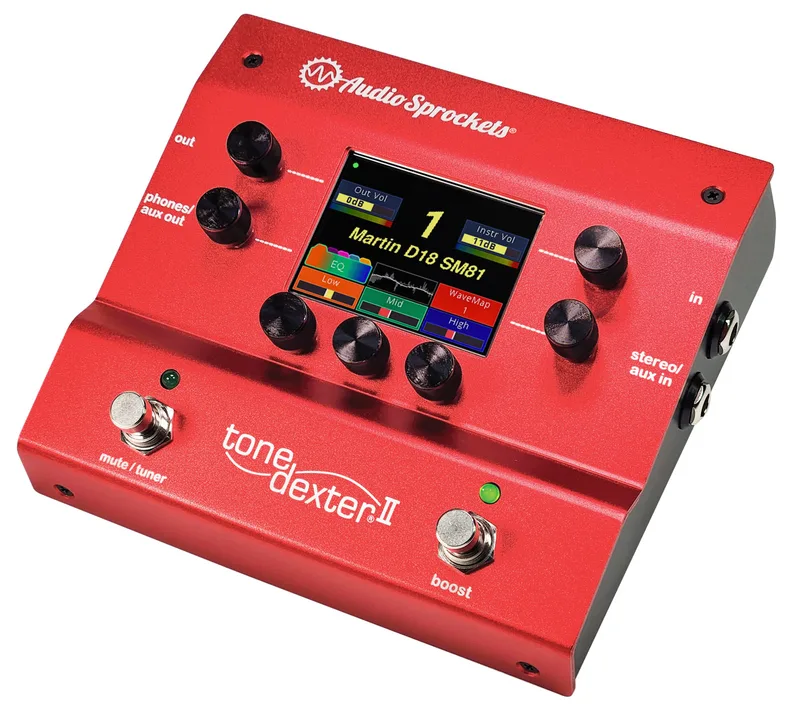


The Audio Sprockets ToneDexter is an acoustic instrument preamp pedal that solves a problem most piezo and magnetic pickup players know well: the pickup never quite sounds like the instrument does in front of a good microphone. Instead of modeling someone else's guitar, the ToneDexter learns the sound of your instrument through your mic. You play into a microphone while the pedal listens to both the mic and the pickup, and it stores the difference as a WaveMap, a correction it then applies to the pickup signal so it comes out sounding like the miked instrument12.
MusicRadar described it at launch as a pedal that "promises to make your acoustic's piezo pickup sound more like a mic'd guitar," available for $399 direct from Audio Sprockets3. The original ToneDexter was discontinued in 2022, and Audio Sprockets replaced it with the redesigned ToneDexter II, launched in January 2024456.
The original ToneDexter was discontinued in 2022 due to a worldwide shortage of computer chips following Covid related supply issues. Audio Sprockets still publishes legacy setup guides, FAQs and repair notes for it, and the ToneDexter II works on the same training principle164.
What the ToneDexter does
Underneath the hood, the ToneDexter is a preamp with tone shaping and anti-feedback controls built around the WaveMap idea. You train it once with a mic and a pickup, and from then on the pedal corrects the pickup so it sounds like the mic. Audio Sprockets puts it plainly: "It creates a stored WaveMap of that miked sound" that you can recall on stage2. Because the correction is stored in one of 22 presets, a working player can keep a separate WaveMap for each instrument. Rory Hoffman, who endorses Audio Sprockets, notes that "with the 22 presets available on ToneDexter, now all of my instruments can have their own WaveMap"2. Molly Tuttle has used one on stage2.
The unit is designed for a wide range of instruments. MusicRadar lists guitar, dobro, viola, cello, bouzouki, mandola, mandocello and baritone guitar, with additional software versions for higher pitched instruments such as violin, mandolin, banjo and ukulele, as well as for upright bass3.
Controls and features on the original unit include:
- Bass and Treble EQ1
- A Phase switch on the rear panel that flips the polarity of all outputs; one position is usually less prone to feedback, and the position does not affect training6
- A notch control for feedback mitigation on firmware V2.0 and later6
- A Mute switch that taps into MUTE&TUNE mode; tapping it during training aborts back to MUTE&TUNE7
- A rear mic jack providing 48V phantom power for condenser mics7
Training a WaveMap
Training is the heart of the pedal, and it is simpler than it sounds. You plug a mic into the rear mic jack, which provides 48V phantom, set levels, and play while the unit compares the two signals7. The display shows LV during the level setting phase and TL during the learning phase, and you can tap the right switch to audition the live mic signal on headphones6. Training normally takes about a minute; if it takes much longer, the mic signal is probably excessively hot, and there is no mic gain adjustment6.
A few practical points from Audio Sprockets' own guidance:
- Where to train: almost anywhere. "You can train in your living room, in your kitchen, and yes even in your car," because the WaveMap picks up very little of the room sound6.
- What to play during level setting: a repetitive chord or notes without low resonances. For guitar, repeatedly strum the upper four strings at the 5th fret; for violin, middle range double stops; for upright bass, arco open A or D string6.
- A hot mic: turn on the mic's built-in pad, move it further away, use a less sensitive mic, or use an inline 10dB attenuator6.
- Feedback handling: on firmware V1.66 and below, an algorithm automatically finds the instrument's hot spots and dials them back; training from slot 22 bypasses it for a studio quality mic sound. On V2.0 and later, feedback mitigation is no longer automatic and the notch control is used instead6.
Recommended mics. Audio Sprockets recommends a small diaphragm condenser, naming the Shure SM81, sE Electronics sE8, Slate ML-2, Rode NT5, Line Audio CM4, Marshall MXL-600 and Sterling ST-31. Large diaphragm condensers also work well, dynamic mics can yield usable results, and tube mics are not recommended. Cardioid and omnidirectional patterns both give excellent results, and active ribbon mics may be used; passive ribbons work so long as they tolerate 48V phantom6.
The ToneDexter II simplifies this process: it automatically sets instrument gain and mic gain in Train-Level Set mode to preserve headroom, training takes about a minute with a progress bar and headphone monitoring, and you can successively tap the Boost switch to audition the WaveMap, the raw pickup, and the live mic sound before storing8. Audio Sprockets says the general training principles are the same, "now with simpler training and enhanced WaveMap quality and control"7.
Power and connections
The ToneDexter works from 9 to 15V and tolerates either the effects pedal standard of negative center or the more general positive center standard6. The catch is current: it requires about 5 to 6 watts, more than many adapters can provide. The supplied power supply is a 12V DC 1.0A unit (input 100 to 240V, 50 to 60Hz) with four international socket adaptors6. For pedalboard use, Audio Sprockets recommends the Voodoo Lab Pedal Power Digital or Mondo (paralleling two outputs together), or the Strymon Ojai or Zuma6.
Connections cover four modes: Training, Live, Studio and Reamping1. The signal path is a 1/4" high impedance (1MΩ) pickup input and a 1/4" line output with a level pot on the front panel, with latency under 1ms1. A MIDI controller can select WaveMap presets if you select MIDI on the rear panel control select switch, using a Type A MIDI to TRS cable wired with DIN pin 5 to tip, pin 4 to ring, and pin 2 to sleeve9.
Hum with a passive piezo pickup, and sometimes with an active system, usually means your system is not grounded. Plugging one of the outputs into a grounded system eliminates the hum6.
Firmware updates and versions
Firmware history matters on a used unit, because behavior changed across versions:
| Firmware | What changed |
|---|---|
| V1.40 | Adds moving WaveMaps in and out of the unit for backup, archiving and use on multiple units, with alphanumeric names on a computer; the file format is proprietary610 |
| V1.66 and below | Feedback mitigation runs automatically during training; slot 22 bypasses it for studio use6 |
| V2.0 and later | Feedback mitigation no longer automatic; notch control used instead6 |
| V2.7 | Adds a built-in audition looper, so an external looper is no longer needed for comparing sounds while adjusting11 |
Updates load from an SD card, and the card format is the common stumbling block. FAT32 is required: on Windows choose FAT32, since FAT16, FAT and exFAT are not the same thing; on Mac choose FAT, which in the Mac world does mean FAT32. An ERR message during update usually means the card is not actually FAT32. FAT32 is only possible on cards of 32GB capacity or less, and Toshiba and SanDisk 2GB cards do not work. Power the unit off for at least 15 seconds before powering up with the card in the slot to start the update6.
WaveMap banks are split by instrument: the lower bank (slots 1 to 11) has EQ control ranges tailored for guitar, and the upper bank (slots 12 to 22) is optimized for higher pitched instruments like mandolin, violin, ukulele and banjo. Slot R22 gives the most mic-like sound without feedback adjustments, for studio recording67. General maps and bass maps each live in their own distinct memory space inside the unit10.
From ToneDexter to ToneDexter II
After the original ToneDexter was discontinued in 2022, Audio Sprockets launched the redesigned ToneDexter II in January 2024456. Like the original, it is an acoustic instrument preamp pedal, and it is available now12. It expands the WaveMap storage to 32 slots, with all parameters automatically stored and recalled with each one12. For players weighing the two, the ToneDexter II page covers the current model in detail.
For the original unit, Audio Sprockets still provides the version 2.0 user guide, circuit board removal and re-installation instructions for repair, and a factory footswitch replacement service at $100 including return shipping in the US for both switches13146. The footswitches are tactile switches mounted on the PCB under spring-loaded actuators; the replacement part is the Alps Alpine SKHCBHA010, with the plastic nib snipped off before installing6.
Videos
Andertons Music Co
Andertons Music Co
Sweetwater
Questions
Why was the ToneDexter discontinued?
Audio Sprockets discontinued the original ToneDexter in 2022 because of a worldwide shortage of computer chips following unprecedented demand from Covid related supply issues. The company redesigned it and launched the ToneDexter II in January 2024, which works on the same training principle with simpler operation and enhanced WaveMap quality.
What microphone should I use to train a ToneDexter?
Audio Sprockets recommends a small diaphragm condenser mic, naming the Shure SM81, sE Electronics sE8, Slate ML-2, Rode NT5, Line Audio CM4, Marshall MXL-600 and Sterling ST-31. Large diaphragm condensers also work well, dynamic mics can give usable results, and tube mics are not recommended. Cardioid and omnidirectional patterns both give excellent results.
Can a MIDI controller change ToneDexter presets?
Yes. A MIDI controller can select WaveMap presets, but you need to select MIDI on the rear panel control select switch, and you need a Type A MIDI to TRS cable wired with DIN pin 5 to tip, pin 4 to ring, and pin 2 to sleeve.
Does the ToneDexter work with mandolin, violin or bass?
Yes. The standard unit suits guitar, dobro, viola, cello, bouzouki, mandola, mandocello and baritone guitar. Separate software versions cover higher pitched instruments like violin, mandolin, banjo and ukulele (HGH), and upright and bass (BAS), with general and bass maps kept in distinct memory spaces.
What SD card format does the ToneDexter firmware update need?
FAT32. If the card is not actually formatted for FAT32 the unit shows an ERR message during the update. On Windows choose FAT32, since FAT16, FAT and exFAT are not the same; on Mac choose FAT, which means FAT32 there. FAT32 is only possible on cards of 32GB or less, and Toshiba and SanDisk 2GB cards do not work.
How do I fix hum with a piezo pickup on the ToneDexter?
With a passive piezo pickup, and sometimes with an active system, you may hear AC power line hum if your system is not grounded. Plugging one of the outputs into a grounded system eliminates the hum.
Sources (14)
- Legacy ToneDexter, Audio Sprockets, 2025-12-19
- Artists that rely on Audio Spockets' ToneDexter Preamp, Audio Sprockets, 2026-04-20
- Audio Sprockets' ToneDexter pedal promises to make your acoustic's piezo pickup sound more like a mic'd guitar, MusicRadar, 2018-05-08
- Audio Sprockets Launches ToneDexter II Pro Preamp, Audio Sprockets, 2024-02-14
- Audio Sprockets ToneDexter II Pedal Now Available with TapDexter, Audio Sprockets, 2024-07-04
- Legacy ToneDexter FAQs, Audio Sprockets, 2024-09-13
- Setup and Training for the legacy ToneDexter with a Mic, Audio Sprockets, 2024-01-04
- Audio Sprockets, Audio Sprockets, 2024-07-04
- Can I Control ToneDexter with MIDI?, Audio Sprockets, 2025-04-10
- Wavemap Transfer Feature Instructions for Legacy ToneDexter, audiosprockets.com, 2024-01-04
- Can I use a looper with ToneDexter?, Audio Sprockets, 2025-03-19
- ToneDexter II, Audio Sprockets, 2025-12-23
- Legacy ToneDexter User Guide, Audio Sprockets, 2025-12-19
- Legacy ToneDexter Circuit Board Removal and Re-Installation, audiosprockets.com, 2025-12-19