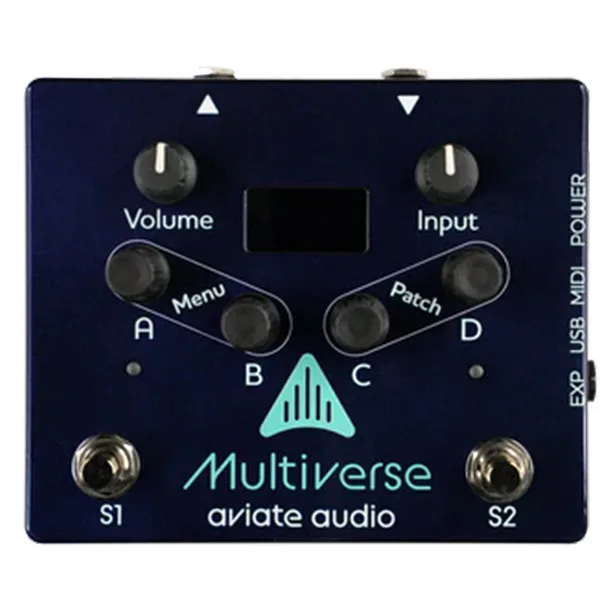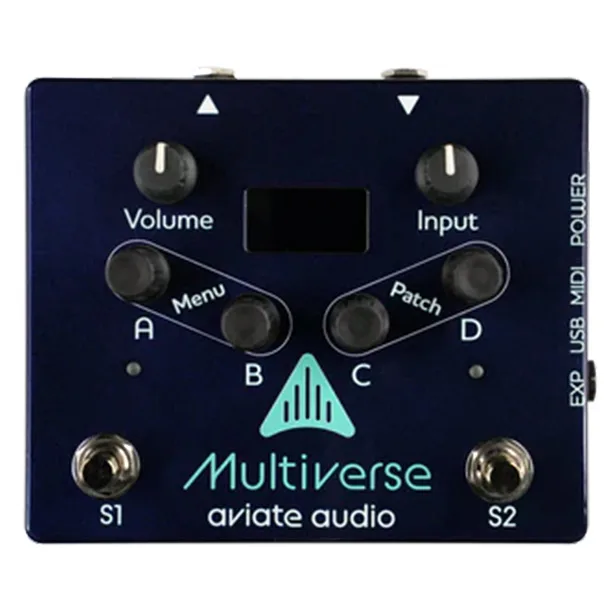


The Aviate Audio Multiverse Player Edition includes two stomp switches that let you bypass the effect or switch between presets1. Those two switches are the pedal's on-board control for playing: one action takes the effect out of the signal, and the other moves you between the presets you have stored on the unit1.
What it does
On the pedal itself, the player-facing controls are its two stomp switches. They let you bypass the effect or switch between presets, so you can move from one saved sound to another mid-song without reaching down to the unit's other controls1.
The controls
On the pedal itself, the controls are laid out for editing from the front panel:
- Four rotary encoders with switches that let you adjust and select settings1
- Gain and Level dials on the matte black enclosure2
- A 1.3 inch OLED display that shows the name and parameters of the current effect1
- Two stomp switches that let you bypass the effect or switch between presets1
Connections and power
The Multiverse pedal has stereo input and output jacks that support 1/4 inch TRS cables, and MusicRadar notes the Multiverse can be run in stereo12. It also has a MIDI input that lets you control the pedal with external MIDI devices, though a MIDI adaptor is recommended and sold separately1. The unit has MIDI and USB connections2.
Power is flexible: it can be powered by either a DC power input or the USB C port1.
The MIDI adaptor is recommended but sold separately, so plan for that if you intend to control the pedal from external MIDI devices2.
You can also attach two external expression pedals to control parameters while you play; MusicRadar describes these as a pair of expression pedal inputs with TRS connections12.
Where it came from
Whichever version of the Multiverse a player picks up, the on-board control scheme is the same: the pedal includes two stomp switches that let you bypass the effect or switch between presets1.
Videos
Aviate Audio
Aviate Audio
Aviate Audio
News
Questions
What is the Multiverse Designer plugin?
Multiverse Designer is a software interface that works with the Multiverse pedal and lets you create and edit effects with a graphical user interface. The pedal also ships with the Aviate Audio Effect Creator app for creating, controlling and editing digital effects, with the pedal applying the DSP and presenting signal routing options. Version 1.3.0 was set to launch in February 2024, adding IR support for cabinet emulation management.
Can the Multiverse Player Edition run on USB power?
Yes. According to Delicious Audio, the pedal can be powered by either a DC power input or the USB C port, so a USB connection to a computer or suitable power supply can run it as well as a standard pedal power input.
Does the Multiverse Player Edition have stereo inputs and outputs?
Yes. The pedal has stereo input and output jacks that support 1/4 inch TRS cables, and MusicRadar notes the Multiverse can be run in stereo.
How many expression pedals can the Multiverse Player Edition use?
Two. You can attach two external expression pedals to control parameters while you play, and MusicRadar describes them as a pair of expression pedal inputs with TRS connections.
Does the Multiverse Player Edition have MIDI?
Yes. The unit has MIDI and USB connections, and Delicious Audio notes a MIDI input that lets you control the pedal with external MIDI devices. A MIDI adaptor is recommended and sold separately.
Sources (2)
- New At NAMM: Aviate Audio Multiverse Player Edition, Delicious Audio, 2024-02-05
- NAMM 2024: “The ultimate platform to make boutique audio effects for musical instruments”: Aviate Audio unveils the Multiverse Player Edition, MusicRadar, 2024-01-24