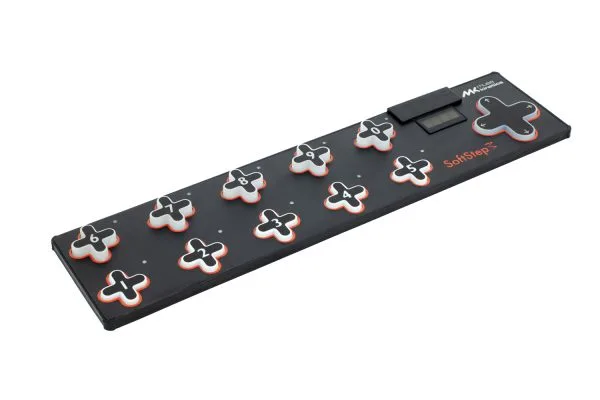

The Muse Kinetics SoftStep3 is a MIDI foot controller pedal: a floor unit you play with your feet to send MIDI Notes, CCs and Program Change messages to MIDI-capable effects, amps and synths. Muse Kinetics describes it as the latest in its SoftStep line, and it connects to more destinations than earlier versions with TRS MIDI Out, two CV outputs and MIDI over USB-C1. It sits in the wider family of MIDI pedals alongside switching pedals and expression pedals.
What it does
The SoftStep3's defining feature is pressure sensing. Sensors under each pad detect pressure in 3D, and the X-, Y- and Z-axis of each pad can be mapped to MIDI CCs, so a player can lean, tilt or press harder on a key for continuous, dynamic expression of effects parameters rather than simple on-off switching1.
The CV outputs send Pitch and Gate CV messages, which lets the SoftStep3 drive Eurorack and modular synth rigs directly alongside its MIDI duties1.
Layout and controls
The floor unit carries ten keys, numbered 1 to 5 on the bottom row and 6 to 0 on the top row, plus a Nav Pad to the right2. Pressing the Nav Pad left or right changes presets, and its Up and Down functions can be programmed to perform a number of different functions2.
A four-character display shows what preset is currently loaded, the name of an activated key, and real-time parameter values, which helps when programming or performing without bending down2.
Editor software
The SoftStep Editor software is used to program the unit, and Muse Kinetics states it is fully backwards compatible with previous versions of the SoftStep hardware2. For players upgrading from an earlier SoftStep, that means the same editor covers both.
Videos
Muse Kinetics
Questions
What can the SoftStep3 control?
It is a MIDI foot controller that sends MIDI Notes, CCs and Program Change messages, so it can change presets and tweak parameters on MIDI-capable effects and amps. It also has two CV outputs that send Pitch and Gate messages to Eurorack and modular synth rigs, and a pedal input for an external expression pedal that sends MIDI CC messages.
How do the pads work?
Sensors under each pad detect pressure in 3D. The X, Y and Z axes can be mapped to MIDI CCs, so leaning, tilting or pressing harder on a pad gives continuous, dynamic control over effects parameters rather than simple on-off switching.
Sources (2)
- SoftStep3, Muse Kinetics (keithmcmillen.com)
- SoftStep Manual, Keith McMillen Instruments, 2024