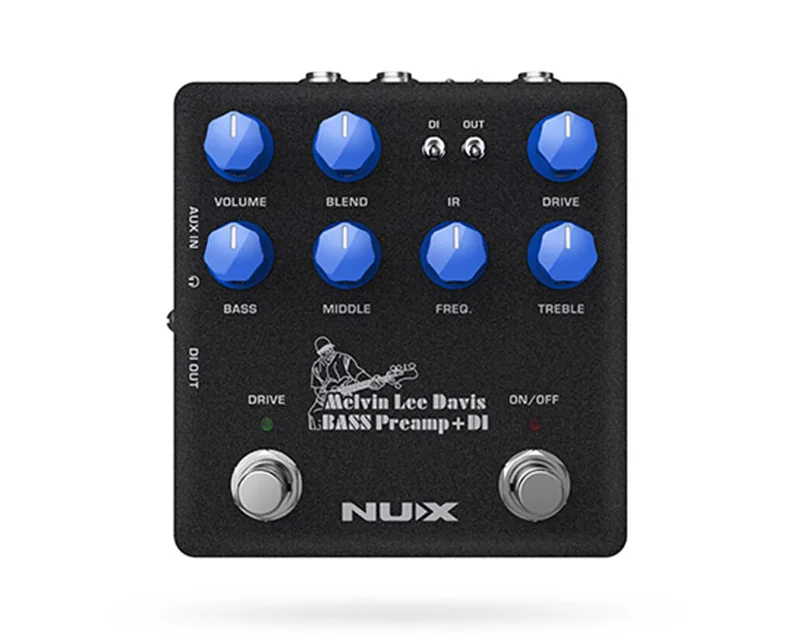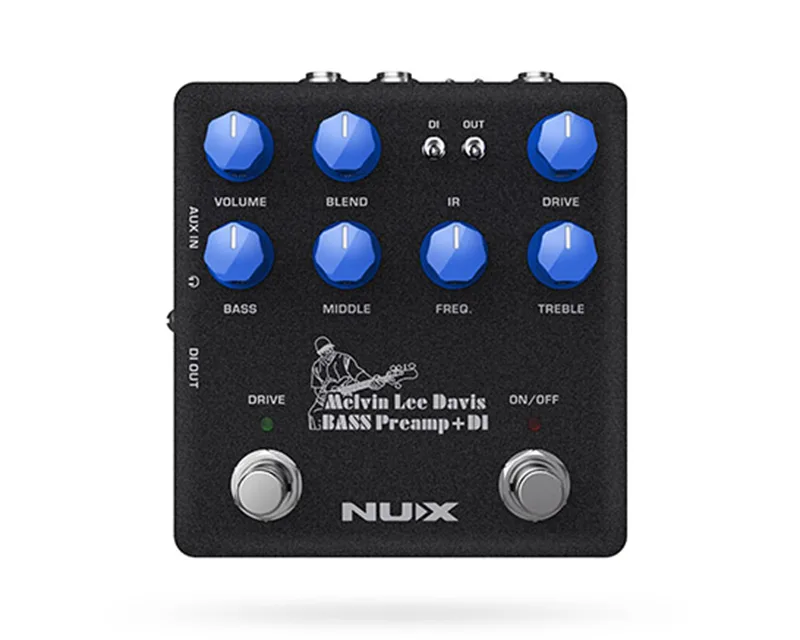


The NUX Audio MLD Bass Preamp + DI is a bass guitar preamp, DI box, impulse response (IR) loader and audio interface in one pedal. It was created in collaboration with American bass player Melvin Lee Davis, and it carries his initials in its name. NUX describes it as offering "the best sound-shaping controls," including a 3-band EQ with middle-frequency selection, drive with a blend control, speaker cabinet simulation and built-in noise reduction.1
For a bass player, that combination covers a lot of ground: tone shaping before an amp or modeler, a direct box for the PA, cabinet simulation for silent or ampless rigs, and a USB interface for recording at home. It sits among preamp pedals and speaker simulation pedals on the site's type pages.
A signature design with Melvin Lee Davis
The MLD is a signature product. NUX states: "We collaborated with American bass player Melvin Lee Davis to create MLD Bass Preamp & DI."1 The artist page on NUX's site confirms the arrangement from the other side: "NUX collaborated with Melvin Lee Davis to create his signature MLD Bass Preamp & DI."2 Davis is an American bass player, and the pedal's MLD name comes from his initials.1
Sound-shaping controls
The pedal's front panel is built around tone shaping for bass. NUX lists the core features as a 3-band EQ with middle-frequency selection, drive with a blend control, speaker cabinet simulation (an IR loader) and built-in noise reduction with Decay and Threshold controls.1
- 3-band EQ with middle-frequency selection: bass, middle and treble cut and boost, with the middle band's center frequency adjustable rather than fixed1.
- Drive with blend control: overdrive-style grit that can be blended with the clean signal, in the manner of overdrive pedals with a parallel clean path1.
- Speaker cabinet simulation (IR loader): loads impulse responses of bass cabinets so the pedal can sound like a mic'd cabinet when going direct1.
- Noise reduction with Decay and Threshold controls: a built-in gate, similar in purpose to a dedicated noise gate pedal, with controls for how quickly it closes and at what level it engages1.
The Volume knob adjusts the overall output volume of the pedal. NUX describes it as ideal for fine-tuning the output on clean tone, and notes that it also controls the DI output volume.1
Outputs and the Pre-Post switch
The pedal's DI section centers on a balanced XLR output carrying a mic-level signal. A Pre-Post switch decides whether that output carries the affected signal, with the preamp and cabinet simulation applied, or the unaffected signal straight from the instrument.1
That switch matters in a live setting: an unaffected DI gives the front of house a clean bass signal while the player keeps the processed tone on stage, and an affected DI sends the full shaped tone to the PA. The Volume knob governs the DI output level as well as the pedal's overall output.1
USB audio interface and routing options
The MLD doubles as a USB audio interface for recording. NUX lists three routing options for USB audio streaming:1
- NORMAL: create your tone using the pedal, and send the processed signal to the computer.
- DRY OUT: send the bass with no preamp effect or IR simulation, which NUX describes as being for re-amping.
- REAMP: play back a recorded track and process it while recording to a new track.
Firmware V4.0 is available for both macOS and Windows.1
Practice features
For silent practice and playing along, the pedal includes a 1/8-inch (3.5mm) auxiliary input to connect a music player, and a headphones output for silent practicing.1 That makes it usable away from an amp or cabinet, with the cabinet simulation handling the speaker part of the signal chain.
Videos
MyMusicMasterclass
Band On A Budget
Band On A Budget
Questions
Does the NUX MLD Bass Preamp + DI have an XLR output?
Yes. The pedal has a balanced XLR output carrying a mic-level signal. A Pre-Post switch decides whether that DI output carries the affected signal, with the preamp and cabinet simulation applied, or the unaffected signal straight from your bass. The Volume knob also controls the DI output volume, so you can set the level going to the front of house or an audio interface.
Can the NUX MLD work as a USB audio interface?
Yes. The pedal doubles as a USB audio interface with three routing options. NORMAL sends the processed signal you build with the pedal. DRY OUT sends the bass without preamp effects or IR simulation, which is for re-amping later. REAMP plays back a recorded track and processes it while you record to a new track.
What does the Pre-Post switch do on the NUX MLD?
The Pre-Post switch sets what the balanced XLR output carries. In one position the DI signal is affected, meaning it has been through the pedal's preamp, drive and cabinet simulation. In the other it is unaffected, so the sound engineer receives the raw bass signal while you keep your processed tone on stage.
Does the NUX MLD have cabinet simulation?
Yes. The pedal includes speaker cabinet simulation and works as an impulse response loader, so you can load cabinet IR files. That makes it usable direct to a PA or audio interface without a bass cabinet, and the simulation can be applied or left off the DI output depending on the Pre-Post switch setting.
Does the NUX MLD have an aux input for a music player?
Yes. There is a 1/8-inch (3.5mm) auxiliary input for connecting a music player, paired with a headphones output. That combination lets you play along with tracks or practice silently without an amplifier or additional hardware.
Which operating systems does the NUX MLD firmware support?
Firmware V4.0 is available for both macOS and Windows, so the pedal can be updated and used as a USB audio interface with either platform.
Sources (2)
- MLD Bass Preamp + DI, NUX Audio, 2025-08-21
- Melvin Lee Davis, NUX Audio