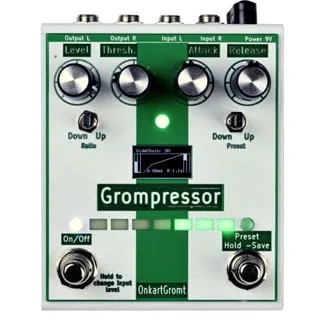


The Grompressor is an advanced compressor pedal from OnkartGromt, a Norwegian bass pedal maker. Delicious Audio's Paolo De Gregorio described it as "an advanced compressor. Very useful for the bass player," and it sits in the compressor lane of a bass rig, evening out dynamics before the signal moves on to overdrive, distortion or preamp stages1.
Unlike simple one-knob compressors, it exposes the full set of controls a studio compressor would have, and it adds a three-preset memory and a side-chain function. It also handles stereo input and output1.
The controls
The Grompressor's knobs cover the standard compressor parameters, each with a wide range:
| Control | What it does | Range |
|---|---|---|
| Threshold | Adjusts where the compression kicks in | 0 to 70dB |
| Ratio | Changes the compression ratio | 1:1 to 1:20 |
| Attack | Adjusts the attack time | 1 to 200ms |
| Release | Adjusts the release time | 20 to 2000ms |
| Level | Adjusts the gain after the compression (make-up gain) | - |
All of these come from Delicious Audio's product write-up1.
Presets and the adjustable settings
The preset switch does double duty. As a memory, it lets you "Save up to 3 presets that can be loaded by clicking the right Footswitch." To save one, navigate to the preset number you want and hold the footswitch until it shows SAVED; a fast click loads it again1.
Pushing the preset switch to the right opens the pedal's adjustable settings instead. There you can set the blend-level, set the input gain over a range of 0 to 22.5dB, and activate the side-chain function. All of these are controlled by the Level knob1.
The side-chain function, blend-level and input gain share the Level knob with the make-up gain control, so which parameter the knob sets depends on which mode the preset switch is in.
Side-chain and stereo
Side-chain compression, where the pedal reacts to a separate detection signal rather than the main input, is activated through the adjustable settings described above1. The stereo input/output means the pedal can sit in a stereo bass or guitar setup without collapsing the signal to mono1.
Videos
Eirik Stordrange
VintageandRare
Questions
How many presets does the OnkartGromt Grompressor store?
The Grompressor stores up to 3 presets. You save a setting to a preset number by holding the right footswitch until the display shows SAVED, and you load a saved preset by clicking that footswitch quickly. The presets are selected with the preset switch, which steps through the three stored numbers.
How do you save a preset on the Grompressor?
Navigate to the preset number you want to save to, then hold the footswitch until it shows SAVED. Once saved, a preset can be loaded by clicking the right footswitch fast. The preset switch is also used to reach the pedal's adjustable settings, including blend level, input gain and the side-chain function.
Does the Grompressor have stereo inputs and outputs?
Yes. Delicious Audio's write-up of the Grompressor lists stereo input/output among its features, so the pedal can be used with stereo instruments or in stereo rigs as well as with a single bass or guitar.
What is the threshold range on the Grompressor?
The Threshold knob adjusts where the compression kicks in over a range of 0 to 70dB. Together with the Ratio knob, which runs from 1:1 to 1:20, it sets how hard and how early the pedal compresses your signal.
Can the Grompressor do side-chain compression?
Yes. The side-chain compression effect can be activated through the pedal's adjustable settings. Push the preset switch to the right to reach the settings, where the side-chain function is activated alongside blend-level and input gain, all controlled by the Level knob.
What is the ratio range of the Grompressor?
The Ratio knob changes the compression ratio from 1:1, which is no compression, up to 1:20, which is heavy compression. Combined with the 0 to 70dB threshold range, it covers everything from gentle leveling to firm limiting.
Sources (1)
- OnkartGromt Grompressor (for Bass), Delicious Audio, 2018-03-05