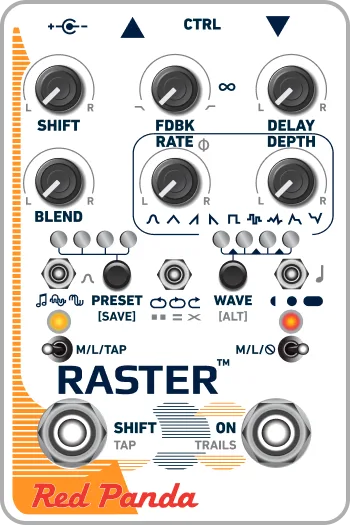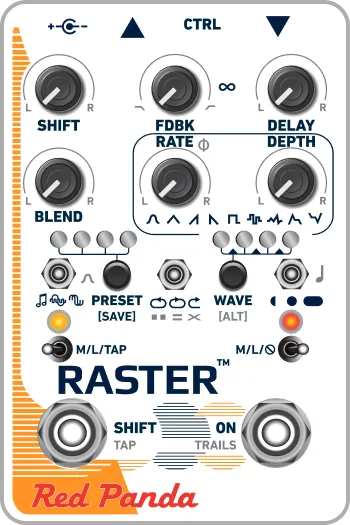


The Red Panda Raster 2 is a stereo digital delay pedal with a pitch and frequency shifter integrated into the feedback loop, so each repeat comes back shifted in pitch rather than simply quieter1. Red Panda describes it as delivering "a wide range of sounds including modulated and harmonized delays, reverse delays, chorus, arpeggios, infinite descents, chaotic self-oscillation, and continuously evolving soundscapes"2. It was announced at Summer NAMM 2021 as the successor to the original Raster, and it is designed and assembled in the USA by Red Panda32.
Because the pitch and frequency shifter sits in the feedback path, each repeat can come back shifted in pitch rather than simply quieter, and delay times span from a 1/128th note up to a whole note1. Short delay times with high feedback create cascading shifted trails, the effect Red Panda points to when describing the pedal's arpeggios, infinite descents and chaotic self-oscillation2.
What it does: delay with a pitch shifter in the feedback path
The Raster 2's defining idea is where the pitch shifter sits: inside the delay's feedback loop13. On a conventional delay, repeats fade at the same pitch. Here, each repeat can be transposed, detuned, or phase and frequency shifted, so a single note can climb or fall in intervals, harmonize itself, or dissolve into alien textures15. Delay modulation changes the pitch, like an analog or tape delay, as the pedal reads and writes its delay memory faster or slower1.
The shift control covers transpose, detune, and phase/frequency shift modes, selectable over MIDI as CC #104, with a range up to an octave in each direction16. The two delay channels can be arranged in series, parallel, or ping pong7.
A modulation mode offers seven waveforms plus envelope and inverse envelope settings, assignable to delay time, pitch shift, or the effect level86. MusicRadar's Rob Laing described the possibilities: "There are two random waveforms for glitchy sliced delays or random pitch shift, wow and flutter, and broken tape deck effects; envelope and inverse envelope enable dynamic flanging and pitch bent delays; stereo controls adjust the modulation amount and phase between channels, for subtle shifts or swirling psychedelic washes"8.
Controls, delay ranges and reverse delay
The front panel keeps the fast, knob-driven feel of the original. The DELAY time knob sets delay time within the selected range, and the delay range switch chooses 400 ms, 800 ms, or 1600 ms maximum1. Three delay ranges let you precisely dial in resonant feedback sounds and instantly change delay time with rhythmic shifts7. A 3200 ms forward delay, with 1600 ms reverse, is available using the editor or MIDI and can be saved in presets1.
| Control | What it does |
|---|---|
| Delay time range | 1/128th note to whole note1 |
| Feedback mode switch | Forward, forward with shift once, reverse, or reverse with shift once1 |
| SHIFT footswitch mode | Momentary, latching, or tap tempo1 |
| Bypass footswitch | Soft touch, selectable momentary, latching, or mute output28 |
Reverse delay is on the feedback mode switch, and also reachable over MIDI as CC #106 with four modes: forward, forward / shift once, reverse, and reverse / shift once1. With feedback and pitch shifting, short delays create cascading shifted trails and alien textures, including reverse delay with shifting5.
Knob responses are carefully tuned for exploration of self-oscillation and feedback on the verge of blowing up, as Pedal of the Day put it7.
Power
The Raster 2 draws 250 mA1. The power connector is a 2.1mm inside diameter, 5.5mm outside diameter barrel1.
The 250 mA draw rules out a battery, and the pedal needs a supply rated at 250 mA or higher, so plan for its own tap on a powered board rather than sharing a small daisy chain output1.
MIDI, expression and the CTRL port
The CTRL port is a 1/4" TRS jack that accepts an expression pedal, tap tempo switch, remote switch, or MIDI1. The port also supports control voltage, the Red Panda Remote 4 (or a DIY switch), a normally open tap tempo switch, and 1/4" MIDI using a third-party adapter9.
MIDI works two ways: USB MIDI in and out through the mini B receptacle, and 1/4" TRS MIDI input only1. The pedal sends and receives on MIDI channel 1 by default, changeable via SysEx or the web editor and remembered when power is off1. Because the TRS port is input only, the web editor can change parameters but will not show the pedal's current state1.
MIDI clock sync is set by turning on Receive MIDI Clock in the web editor's Config tab, or by sending CC #110 with a value of 64 to 127; the setting survives power cycles1. The pedal uses 24 timing clock messages every quarter note (24 PPQ), and it is common to have plus or minus 1 millisecond of jitter1. Delay time and modulation rate can be set in note divisions, from 1/128th note to whole note for delay and 1/32nd triplet to 8 measures for modulation rate1.
Selected MIDI continuous controllers1:
| CC | Function |
|---|---|
| 89 | Remote tap (receive only), values 64 to 127 |
| 90 | Shift on/off (receive only) |
| 102 | Modulation waveform: sine, triangle, ramp up, ramp down, square, random step, random smooth, envelope, inverse envelope |
| 103 | Modulation destination: wet amplitude (tremolo) or delay time (default) |
| 104 | Shift mode: transpose, detune, phase/frequency shift |
| 105 | Delay structure: parallel (default), ping pong, series |
| 106 | Feedback mode: forward, forward / shift once, reverse, reverse / shift once |
| 107 | Delay range: 400, 800, 1600, or 3200 ms (1600 reverse) |
| 110 | Receive MIDI clock (global) |
| 111 | Trails mode: off, on, or use global setting |
Firmware updates and support
Firmware updates are drag and drop over USB Mass Storage using any Mac or PC, with no driver or special software required1. The procedure:
- Hold down the SHIFT (left) footswitch and connect power.
- The right LED will blink blue.
- Hold for two seconds until the LED is solid blue to enter USB Mass Storage mode.
- Read the VERSION.TXT file to check the firmware version.
- Download the firmware zip from redpandalab.com, which contains the .bin file, and copy it to the pedal over a mini USB cable.1
The manual covers firmware 2.0 and later1. For technical support, email support@redpandalab.com or use the contact form on the web site, including the pedal's serial number; replies may take a few days1. Red Panda asks owners to register at redpandalab.com/register within 30 days of purchase, and the pedal carries a one year limited manufacturer's warranty covering manufacturing defects, with repair or replacement at Red Panda's sole discretion and proof of the original purchase date required1.
What changed from the original Raster
The original Raster, launched in 2015, was a 750 ms digital delay with a pitch shifter in the feedback loop, covering delay, pitch shifting, and phase shifting10. The Raster 2 more than doubles the delay time, from 750 ms to 1600 ms, and moves to a smaller enclosure measuring 3 inches wide with all jacks on top3. Delicious Audio noted that "the original Raster was praised for its knob response and immediacy, and the Raster 2 maintains that simplicity" while adding flexible modulation and extensive stereo functionality3.
Designer Curt Malouin, who handled design and engineering, documentation, and the web editor, explained the goal: "While designing the Raster 2, I wanted to enable as many classic rack mount digital delay tricks as possible while keeping the fast and intuitive control of the original Raster"3.
What reviewers said
At launch, Premier Guitar reported a MAP price of $2996, and MusicRadar's Rob Laing wrote that it would ship in late summer or early autumn of 20218. The current list price on Red Panda's product page is $329.002.
Premier Guitar's review highlighted the shift range, noting "the control ranges up to an octave in each direction," and that "the modulation function has seven waveforms plus envelope and reverse envelope settings"4. Pedal of the Day highlighted the three delay ranges for resonant feedback sounds and rhythmic shifts, the series, parallel, and ping pong channel arrangements, and the knob tuning for self-oscillation7.
Videos
Red Panda Lab
The Pedal Zone
Mark Johnston
News
Questions
Is the Red Panda Raster 2 stereo?
Yes. It has a 1/4 inch TRS stereo input and a 1/4 inch TRS stereo output, and can run mono in / mono out, mono in / stereo out (the default), or stereo in / stereo out. The routing option is set through the web editor or SysEx.
How long is the delay time on the Raster 2?
The delay range switch offers 400 ms, 800 ms, or 1600 ms maximum delay time. A 3200 ms forward delay, with 1600 ms reverse, is also available using the editor or MIDI, and the setting can be saved in presets.
What changed from the original Raster to the Raster 2?
The Raster 2, announced at Summer NAMM 2021, more than doubles the delay time from 750 ms to 1600 ms, adds flexible modulation and extensive stereo functionality, and moves to a smaller enclosure about 3 inches wide with all jacks on top. It keeps the knob response and immediacy the original was praised for.
How do I update the Raster 2 firmware?
Hold the SHIFT (left) footswitch while connecting power, wait for the right LED to blink blue, then hold for two seconds until it is solid blue to enter USB Mass Storage mode. Download the firmware zip from redpandalab.com, drag the .bin file onto the pedal over a mini USB cable, and read VERSION.TXT to check the version. No driver is needed.
Does the Raster 2 sync to MIDI clock?
Yes. Set Receive MIDI Clock to On in the web editor's Config tab, or send CC #110 with a value of 64 to 127. The setting is remembered when power is off. The pedal uses 24 timing clock messages per quarter note, and about plus or minus 1 ms of jitter is common.
Can the Raster 2 do reverse delay?
Yes. The feedback mode switch selects reverse delay, or forward delay with repeats continuously shifted or shifted once. Reverse delay is also available over MIDI as CC #106, and the 3200 ms range gives 1600 ms of reverse delay.
Sources (10)
- Raster 2 Owners Manual.pdf, Red Panda LLC, 2022-06
- Raster 2, Red Panda
- Red Panda Raster 2 Delay, Delicious Audio, 2023-11-09
- Red Panda Pedals Raster 2 Delay Pedal Review, Premier Guitar, 2022-05-01
- raster_instructions.pdf, Red Panda Lab, 2017
- Red Panda Reveals the Raster 2, Premier Guitar, 2021-07-16
- Red Panda Raster 2 Digital Delay, Pedal of the Day, 2023-03-15
- The Red Panda Raster 2 digital delay boasts some serious upgrades, MusicRadar, 2021-07-19
- Raster 2 QuickStart CZ.pdf, Red Panda Lab, 2021
- Red Panda Raster Delay, Delicious Audio, 2015-06-19