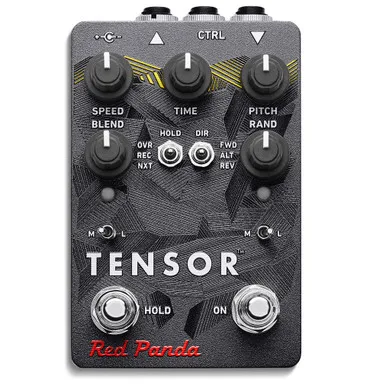


The Red Panda Tensor is a realtime tape stop, slowdown and reverse pedal with time stretching, pitch shifting and looping built in. Where a conventional delay pedal repeats what you played, the Tensor grabs the last few seconds of your signal and lets you drag it through speed and pitch changes as if it were tape on a reel: slow it to a halt, run it backwards, stretch it, or let it stutter and glitch. Red Panda describes the results as ranging "from occasional CD skips, stutters, and rhythmic repeats to random slicing and erratic pitch shifts"1.
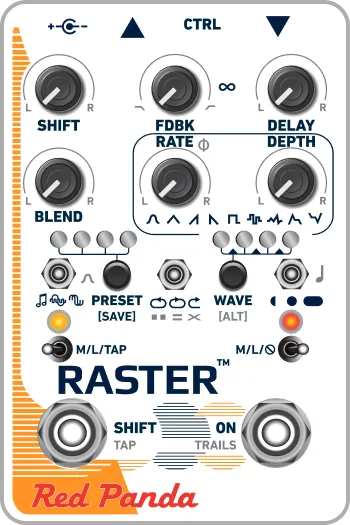
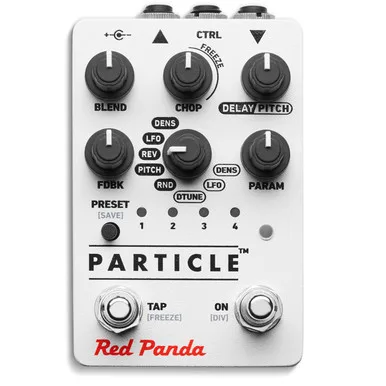
It is a compact, digital pedal designed and assembled in Detroit by Red Panda LLC, with design and engineering by Curt Malouin2. It sits in the same experimental corner of the pedalboard as Red Panda's Raster 2 and Particle 2, but its focus is live manipulation of a short loop rather than delay repeats or granular synthesis.
What the Tensor does: tape stops, reverse and time stretching in real time
The core of the pedal is its treatment of playback speed. The SPEED knob smoothly changes playback speed from forward to reverse as you turn it counterclockwise, and near the middle of its travel the pitch drops as the audio slows, the way an analog recording behaves when the tape is pulled through at a lower speed4. Turned fully counterclockwise, playback runs backwards: short segments of the live audio are read backwards, which Red Panda says simulates the studio trick of flipping a tape over to create a reverse guitar solo4.
The DIR switch sets the playback direction for an active loop and has no effect during live use5. Because the SPEED knob also affects loop direction both live and during looping, the two controls interact, and if both are set to reverse they cancel each other out and the loop plays forward5.
A drift mode extends the tape stop effect: while the Tensor is engaged, holding down the ON footswitch keeps the tape speed effect going without splicing back to current time, and releasing it snaps back2.
The RANDOM knob adds controlled chaos. Rotating it clockwise introduces randomization of the effects, changing both the amount and the type, with speed and pitch randomized based on the knob settings6. Red Panda maps the range out as follows6:
| RANDOM knob position | Result |
|---|---|
| Lower settings | Occasional stutters |
| Middle | Randomly repeats short segments |
| Maximum | Shuffles short slices of sound |
Looping and hold modes
The hold footswitch records a loop you can then manipulate, up to 9.4 seconds in mono or 4.8 seconds in stereo7. In HOLD mode, a toggle switch selects one of three recording modes: OVERDUB, RECORD and NEXT7. In NEXT mode the maximum loop length drops to 4.8 seconds, or 2.4 seconds in mono7. In any mode, pressing the ON switch exits the recording and returns to live playback7.
In OVR (overdub) mode, loop decay can be set via MIDI continuous controller messages so that older overdubs gradually fade away instead of stacking indefinitely2. The patch sheet also maps the footswitches to loop sampler functions: OVR, FWD, REC, ALT, NXT and REV8.
The M/L (momentary / latching) toggle governs how external switches behave. A latching switch must be pressed once to engage and once again to disengage, which Red Panda says is typically useful for simple on/off functionality9.
Power and connections
The Tensor requires a 9V DC 250 mA power supply with a center negative 2.1mm I.D. x 5.5mm O.D. barrel connector, and the supply is not included23.
At 250 mA the Tensor rules out battery power, and its draw is high enough that sharing a daisy chain with low-current analog pedals can cause noise. A dedicated output on an isolated supply is the safe arrangement.
Connections are pedalboard friendly, with all jacks on top3. Audio is stereo over TRS jacks, with 1 MΩ input impedance and under 1 kΩ output impedance3. The CTRL port supports an expression pedal (linear 10 to 25 kΩ), control voltage from 0 to 3.3V, tap tempo, TRS MIDI in and a remote switch, and an expression pedal can be assigned to up to six parameters210. By default the expression jack morphs between the current knob settings and normal playback, but it can be assigned to any of the knobs instead11. Maximum input level is +0.5 dBu in high gain, +5.2 dBu at the default setting and +7.2 dBu at max, with a frequency response of 20 to 20 kHz at +0/-0.5 dB2.
Bypass modes
The Tensor has five bypass modes: analog, DSP, kill dry, analog plus FX level, and auto, which is the default212. The differences matter to how the pedal sits in a chain12:
| Mode | Behavior |
|---|---|
| DSP | Signal always passes through the DSP; smoother switching between bypass and effect |
| Analog | Slightly higher headroom and lower noise, but there may be a click when switching |
| Auto (default) | Chooses DSP when the bypass switch is set to momentary, analog when set to latching |
Versions, firmware and the stereo upgrade
The Tensor's history splits at the serial numbers. Tensors with serial numbers below 67000 are mono input and output only, with 4.7 seconds of hold time2. Later units, serial number 108-067000 and higher, have stereo input and output and a 9.4 second mono / 4.7 second stereo maximum loop time13.
Red Panda sells a user-installable stereo upgrade board for Tensors with serial number 108-066999 and below. After the upgrade, the pedal matches the later spec: 9.4 second mono / 4.7 second stereo maximum loop time with stereo input and output. The board will not work in Tensors with serial numbers 108-067000 and higher, since those already have it13.
Firmware 1.2.3 and later is covered by the current manual2. Firmware version 1.1 added loop sampler functions (retrigger, stop, one shot) via MIDI or remote switch, and 31 presets via MIDI or remote switch3; the product page now lists up to 32 presets1. For MIDI over USB with a Disaster Area Designs controller, Red Panda's setup guidance is to set USB=HOST in Setup, use DEV A, and use the gHOST Adaptor Cable.
The pedal carries a one year limited manufacturer's warranty covering manufacturing defects, with proof of original purchase date required2.
What reviewers said
MusicRadar's buying guide lists the Tensor among its best looper pedals, noting its effects (modulation, tape stops, reverse, time stretch, stutter and more), 9.4 seconds of looping time in mono, and Mini-B USB, and observing that looping with tape machines goes back to Robert Fripp's early experiments14. Reviewing it alongside other loopers, MusicRadar's Alex Lynham wrote:
"Not cheap, but the Tensor can do it all, from glitchy micro looping to 'normal' looping, all the way to esoteric pads and reverse tape sounds"15
Pedal of the Day's 2019 review highlighted the expression jack's default morphing behavior between knob settings and normal playback11. The pedal also made Dennis Kayzer's Best Stompboxes of 2018 list at Delicious Audio16, which that year described it as a pedal that can "loop, overdub, and randomly slice phrases up to 4.8 seconds"17, reflecting the shorter loop time of the early mono units.
Videos
Knobs
Red Panda Lab
Red Panda Lab
Questions
How long can the Red Panda Tensor loop?
The hold footswitch can loop and manipulate phrases up to 9.4 seconds in mono, or 4.7 seconds in stereo. Early Tensors with serial numbers below 67000 are mono only, with 4.7 seconds of hold time; a user-installable stereo upgrade board brings them up to the later spec.
Is the Red Panda Tensor stereo?
Later Tensors, with serial number 108-067000 and higher, have stereo input and output over TRS jacks, with a 4.7 second stereo loop time. Earlier units can be upgraded with a user-installable stereo board from Red Panda, which will not fit units already at 108-067000 and higher.
Does the Tensor come with a power supply?
No. It requires a 9V DC 250 mA power supply with a center negative 2.1mm barrel connector, which is not included. The current draw of 250 mA rules out a battery and makes it a poor candidate for sharing a daisy chain with analog pedals.
What bypass modes does the Tensor have?
It has five bypass modes: analog, DSP, kill dry, analog plus FX level, and auto, which is the default. Auto picks DSP mode when the bypass switch is set to momentary and analog mode when set to latching. Analog offers higher headroom and lower noise but may click when switching.
Can the Tensor be controlled by MIDI?
Yes. It supports USB MIDI in and out as a class-compliant device, plus a 1/4 inch TRS MIDI input, transmitting and receiving on MIDI channel 1 by default. Loop sampler functions such as retrigger, stop and one shot are available via MIDI or a remote switch, and it stores up to 32 presets.
Sources (17)
- Tensor, Red Panda Lab, 2024
- Tensor Owners Manual.pdf, Red Panda LLC, 2023-03
- Red Panda Tensor, Red Panda Lab
- SPEED, Red Panda Lab, 2024
- LOOP DIRECTION, Red Panda Lab, 2024
- RANDOM, Red Panda Lab, 2024
- HOLD, Red Panda Lab, 2024
- Tensor Patch Sheet, Red Panda Lab, 2022
- M/L, Red Panda Lab, 2024
- Tensor QuickStart FR, Red Panda Lab, 2019
- Red Panda Tensor Time Warp Tape Delay, Pedal of the Day, 2019-05-09
- BYPASS, Red Panda Lab, 2024
- Tensor stereo upgrade board (for S/N below 108-067000), Red Panda Lab
- Best looper pedals 2025: My favorite loop stations, MusicRadar (www.musicradar.com), 2022-09-23
- "The Layers is a subtle and unique pedal, with a lot of expressive depth": MXR Layers review, MusicRadar, 2025-01-25
- Best Stompboxes Of 2018 According To Dennis Kayzer, Delicious Audio (delicious-audio.com), 2018-12-31
- Red Panda Tensor Gets The "Knobs Treatment", Delicious Audio, 2018-06-13