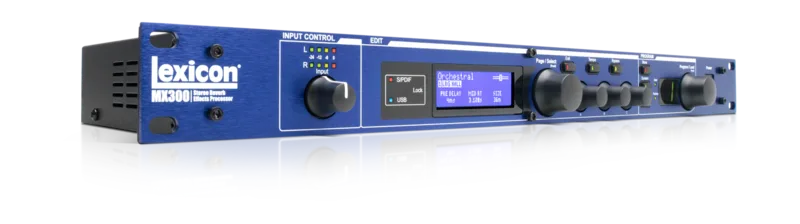


The Lexicon MX300 is a stereo reverb and effects processor in a 1U rack chassis, made by Lexicon Pro. Lexicon describes it as a "Stereo Reverb/Effects Processor with USB Hardware Plug-In Capability", part of the MX line that also includes the MX200 and MX400, and the maker credits that line with changing the market: "Our revolutionary MX200 and MX400 changed everything."1 The MX300 is discontinued, as are the MX200 and MX400.1
For a player, the MX300 sits between a guitar amp rig or a studio's mixing desk and supplies reverb, delay and modulation effects from a single box. Lexicon promises "the rich, detailed texture that makes the Lexicon sound unique" alongside what the maker calls a full arsenal of voice and instrument-enhancing effects.1
Effects and presets
MusicRadar's review lists the MX300's effect set as reverb, delay, chorus, phase, rotary, vibrato, pitch-shift, a dbx compressor and a de-esser. On the reverb side the reviewer writes that "From Plate Reverb to Arena, there's an avalanche of ambience to be had", and notes distinct delays with a tap-tempo button feature.2
Presets number 99, with room for another 99 user-devised settings.2 Lexicon highlights a dedicated program select knob with a bright LED display for dialing up presets quickly.1
Connections: audio, digital, MIDI and control
The MX300's rear panel carries balanced XLR/TRS analog audio inputs and outputs, which MusicRadar notes suit hum-negating cable runs between a stage rig and a desk.2 Digital input and output are on RCA phono S/PDIF connectors, with no optical option.2
Control connections include MIDI In and Thru, which the reviewer says "further enhance control possibilities", and a footswitch jack socket for hands-free preset changes.2
USB hardware plug-in use in a DAW
The MX300's headline feature is its USB hardware plug-in mode. Lexicon states that all parameters of every reverb, delay and dynamic effect in the processor are available inside any PC VST or Macintosh AU compatible DAW program via USB.1 In practice that means the unit behaves like a plug-in window in a recording session while the hardware itself does the processing, so the computer is not spending its own power on the reverb algorithms.
The MX300 is discontinued. Lexicon's product pages for the whole MX line, including the MX200 and MX400, remain online, and the MX200 page describes that unit as designed with both live sound reinforcement and home recording in mind, a framing that applies to the family.13
How it compares in the MX line
The MX line spans three units, and the differences are mostly about channel count and processing depth1:
| Unit | Configuration | Notes |
|---|---|---|
| MX200 | Stereo Reverb/Effects Processor with USB hardware plug-in capability3 | Discontinued3 |
| MX300 | Stereo Reverb/Effects Processor with USB hardware plug-in capability1 | 99 presets plus 99 user slots2 |
| MX400 | 4-in/4-out Reverb/Effects Processor with USB hardware plug-in capability4 | 223 genuine Lexicon settings including 25 dedicated Surround Programs4 |
The MX400, the larger sibling, is described by Lexicon as the most Lexicon power ever offered in a super-affordable 1RU effects processor, and it adds built-in dbx compression and de-essing usable in tandem with reverb. Lexicon pitches it as "Perfect for band PAs, churches and clubs."4
Build, power and what reviewers made of it
MusicRadar's reviewer found the build reassuring: "Solid, metal construction with positive-feeling knobs and buttons inspire confidence."2 Power comes from a C14 inlet mains connection, the kettle-lead style used on computers and amplifiers, so there is no wall-wart or trailing adapter to contend with.2 The review lists the MX300 at just below £300 GBP at the time of writing.2
The reviewer's overall verdict was positive: "Slots into a studio or stage set-up seamlessly and gives very impressive results, especially for the money."2
One point of record worth noting for owners: Lexicon's product page lists the unit's firmware as version 2.3.1.1
Videos
Exclusive Tech Products
Powercoat Music
termohead tv
Questions
Is the Lexicon MX300 discontinued?
Yes. Lexicon Pro's own product page for the MX300 lists it as discontinued, and the same applies to its siblings in the MX line, the MX200 and the MX400. The units still turn up secondhand, and Lexicon's product pages remain online as a reference for owners.
What effects does the Lexicon MX300 have?
MusicRadar's review lists reverb, delay, chorus, phase, rotary, vibrato, pitch-shift, a dbx compressor and a de-esser. On the reverb side the reviewer describes an avalanche of ambience from Plate Reverb to Arena, and notes distinct delays with a tap-tempo button.
How many presets does the Lexicon MX300 have?
The MX300 carries 99 presets, with room for another 99 user-devised settings, according to MusicRadar's review. Presets are dialed up with a dedicated program select knob and a bright LED display.
Can the Lexicon MX300 be used as a plug-in in a DAW?
Yes. Lexicon describes the MX300 as a stereo reverb and effects processor with USB hardware plug-in capability. All parameters of every reverb, delay and dynamic effect can be controlled inside a PC VST or Macintosh AU compatible DAW program over USB, with the processor doing the actual DSP work.
Does the Lexicon MX300 have a power adapter or a mains cable?
It takes a mains cable. MusicRadar's review notes that power comes via a C14 inlet, the same kettle-lead connector used by computers and amps, so there is no wall-wart or trailing adapter to contend with.
Does the Lexicon MX300 have an optical digital output?
No. MusicRadar's review states that the digital input and output are on RCA phono S/PDIF connectors, with no optical option. Players needing optical digital I/O would have to convert or use an interface that accepts S/PDIF.
Sources (4)
- MX300 | Lexicon Pro - Legendary Reverb and Effects | English, Lexicon Pro (lexiconpro.com)
- Lexicon MX300 review, MusicRadar, 2007-12-05
- MX200 | Lexicon Pro - Legendary Reverb and Effects | English, Lexicon Pro (lexiconpro.com)
- MX400 | Lexicon Pro - Legendary Reverb and Effects | English, Lexicon Pro