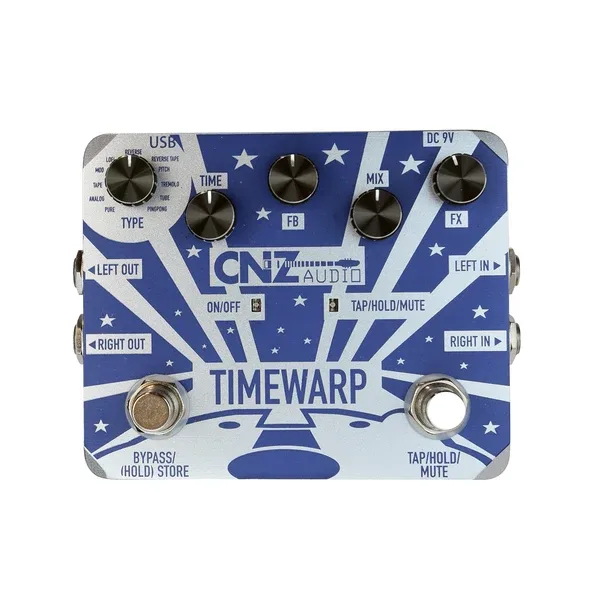


The CNZ Audio STW-50 Time Warp is a delay pedal that packs eleven different delay types into a single compact unit. CNZ Audio describes its range as "From subtle delays to straight-up outlandish echoes, the Time Warp helps you make the effect uniquely you." It sits in the multi-delay corner of the delay pedal world, closer in spirit to a multi-effects pedal than to a single-voice echo box like the CNZ Audio STE-101.
The eleven delay types
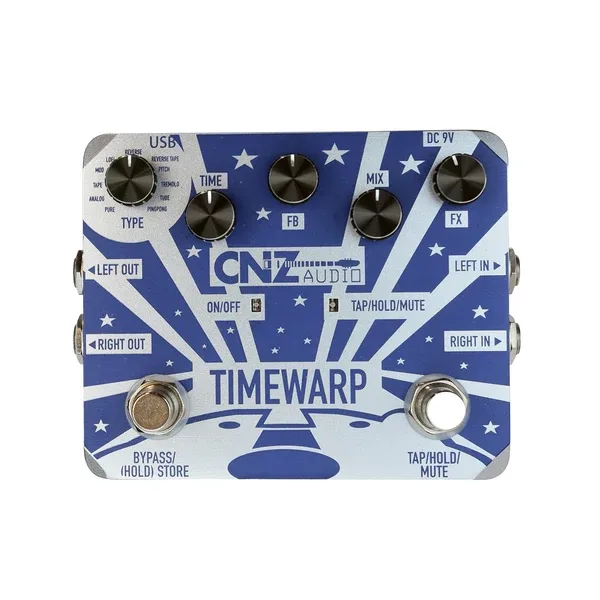
A selector moves between eleven settings, each a different take on delay1:
- Pure, a straightforward repeat
- Analog, in the vein of older analog echo circuits
- Tape, echoing tape machine delays
- Mod, delay with modulation
- LoFi, a degraded, lower-fidelity repeat
- Reverse and Reverse Tape, backwards-sounding echoes
- Pitch, delay with a pitch element
- Tremolo, delay paired with a tremolo style effect
- Tube, a tube-flavored echo
- Ping Pong, repeats bouncing between the left and right outputs
Because the pedal has left and right 1/4-inch inputs and outputs and stereo capability on most delay settings, the Ping Pong mode and the stereo field effects have somewhere to go: run both outputs to a stereo rig or two amps and the repeats can move across the stage rather than sitting in one channel1.
Controls and footswitches
The front panel is three knobs and two switches1:
| Control | What it does |
|---|---|
| Time knob / foot switch | Adjusts the speed of the delay |
| FeedBack knob | Controls the number of repeats |
| Mix knob | Adjusts the volume of the delay |
| Left stomp switch | Bypasses the pedal or holds a delay sound |
| Right foot switch | Tap tempo, for on-the-go tempo changes |
The Time control works from the knob or the foot switch, so a player can set a base time by hand and then tap changes live with the right switch. The left switch doubles as a hold function, which lets a delay sound sustain rather than simply switching off1.
The micro USB port is for uploading and downloading only. CNZ Audio marks it "Do Not Use to Power Pedal", so the pedal must be powered from its 9V DC jack1.
Power, connections and what it accepts
The Time Warp needs a 9V DC supply with a center-negative, positive-outside plug, rated at 500 mA. No supply is included with the pedal, and the 500 mA draw means a low-current daisy-chain output may not be the right home for it on a crowded board1.
CNZ Audio states that "Anything at instrument-level with a 1/4\" output can be run to this pedal (like keyboards, synths, electric orchestral i[nstruments]," so it is not limited to guitar: a keyboard or synth with a standard instrument-level 1/4-inch output can feed it directly1.
Videos
CNZ Audio
CNZ Audio
Aaron J Livecchi
Questions
Does the CNZ Audio Time Warp have tap tempo?
Yes. The right footswitch is the tap tempo switch. CNZ Audio describes it as letting you tap in your delay for on-the-go tempo changes, while the left stomp switch bypasses the pedal or holds a delay sound.
Can I power the Time Warp through its micro USB port?
No. The micro USB port is for uploading and downloading only, and CNZ Audio states plainly that it should not be used to power the pedal. Power comes from a 9V DC supply with a center-negative, positive-outside plug, rated at 500 mA, which is not included with the pedal.
Can the Time Warp save presets?
Yes. The pedal has a Saved Preset Mode, so a setting you dial in can be stored and recalled later rather than reset every time you power up.
Can I use the Time Warp with keyboards or synths?
Yes. CNZ Audio says anything at instrument level with a 1/4-inch output can be run into the pedal, naming keyboards, synths and electric orchestral instruments. The pedal also has left and right 1/4-inch inputs and outputs, with stereo capability on most delay settings.
What power supply does the Time Warp need?
A 9V DC supply with a center-negative, positive-outside connector, rated at 500 mA. CNZ Audio does not include one with the pedal, so you will need to use your own.
Sources (1)
- STW-50 | Time Warp Delay Pedal | CNZ Audio, CNZ Audio