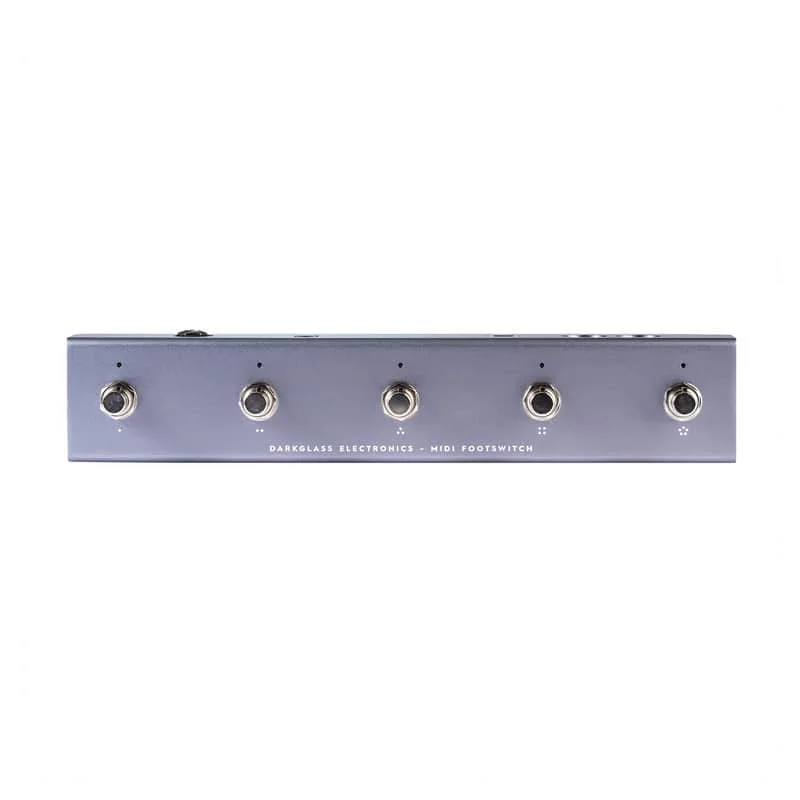

The Darkglass MIDI Footswitch is a five-switch MIDI controller made by Darkglass for its amplifiers and pedals. It is designed first for the Exponent 500 amp and the Infinity 500 Combo, but its MIDI OUT/THRU connector can also drive any generic MIDI device with a 5-pin MIDI cable, and it is USB MIDI compatible12.
Each of the five footswitches can be configured through the free Darkglass Suite software, with ready-to-use templates for Darkglass products, and effect bypasses can be bound to the five footswitches per preset134. Darkglass lists it at £175.00 GBP, and it was sold out at that price on the maker's product page as of 25 October 20262.
What it is and what it does
The unit is a floor controller, not an effects pedal: it sends MIDI program change and control change messages to other gear rather than processing your signal. Darkglass positions it as a companion to the Exponent 500, whose manual notes that the amp's 7-pin MIDI connector is to be used only with the Darkglass MIDI Footswitch, and that effect bypasses can be bound to its five footswitches for each preset6.
Out of the box it needs no programming. The factory configuration sends the default MIDI messages of the Infinity 500 Combo and Exponent 500 presets 1 to 5, on MIDI Channel 1 with Program Change 2 to 61. Beyond that, everything is configured in the Darkglass Suite over USB-C, including ready-to-use templates for Darkglass products25.
There are 16 MIDI channels available, and each can be assigned to a different MIDI device, so one footswitch can command several pieces of gear at once1.
The footswitches and modes
The five footswitches cover 5 main and 5×5 sub layer actions, and the controller works in several modes1.
| Mode | What it does |
|---|---|
| Bank mode | 5 banks with 5 presets each2 |
| Single page mode | Up to 24 commands (program change / control change) sent simultaneously on each footswitch press1 |
| Multi page mode | 6 pages (a top page plus 5 sub pages), each footswitch press sends up to 4 simultaneous commands1 |
| Super Intelligent Footswitch mode | Mimics Darkglass's Super Intelligent Footswitch; no external power supply required when used with the Darkglass Amplifier jack1 |
In Super Intelligent Footswitch mode, recognizable by its blue LEDs, the first four footswitches correspond to the four footswitches of the Super Intelligent Footswitch and AO Super Intelligent Footswitch17.
In Multi page mode the LED colors identify the active page, with the top page shown in white1. In Super Intelligent Footswitch mode, recognized by its blue LEDs, the first four footswitches correspond to the four footswitches of the Super Intelligent Footswitch and AO Super Intelligent Footswitch, labeled CLEAN, VMT, B3K and MUTE1.
Power and connections
The MIDI Footswitch draws only 15 mA, so it is light on a pedalboard power supply1. Darkglass gives several ways to run it:
- 9V DC barrel jack, center negative: works with a generic power supply rated at a minimum of 15 mA12.
- USB-C: connects to a computer for configuring in the Darkglass Suite, or directly to the Darkglass e500 amp for syncing settings; USB power banks and chargers can be used as the power source2.
- Powered by the amp: with the Exponent 500 or Infinity 500 Combo, use the 7-pin MIDI cable and the MIDI Footswitch is powered by the amplifier; Darkglass amps can also power it through the same 1/4" plug used for the data, giving full operation over a single cable14.
Only use a regulated 9V DC adapter with a center-negative plug. Darkglass warns that unregulated power supplies or higher voltages may result in suboptimal noise performance and can damage the unit, voiding the warranty4.
On the connection side, the 5-pin DIN MIDI IN jack takes a MIDI OUT from another device and passes those messages through to the MIDI OUT/THRU connector, so the unit can sit mid-chain in a larger MIDI rig; MIDI THRU can be disabled in the Darkglass Suite under Settings1. The 1/4" TS jack connects to the FOOTSWITCH connector of Darkglass amplifiers1.
Firmware and setup
Firmware is handled entirely through the Darkglass Suite: the current firmware version and firmware updates are found on the Settings tab1.
- Connect the MIDI Footswitch to a computer with a USB-C cable2.
- Open the Darkglass Suite and go to the Settings tab1.
- Apply the update from there1.
During the update, do not disconnect the MIDI Footswitch or close the Suite1. If a settings sync with the amp fails, Darkglass advises connecting a dedicated 9V power supply to the MIDI Footswitch and trying the USB connection again1.
Videos
Darkglass Electronics
Questions
Does the Darkglass MIDI Footswitch work with non-Darkglass MIDI pedals?
Yes. The MIDI OUT/THRU connector can be used with a 5-pin MIDI cable to connect to any other generic MIDI device, not just Darkglass gear. There are 16 MIDI channels available, and each can be assigned to a different MIDI device, so several units can share one controller.
Does the Darkglass MIDI Footswitch need a power supply with an Exponent 500?
No, not for normal use. When it is connected to the Exponent 500 or Infinity 500 Combo with the 7-pin MIDI cable, the MIDI Footswitch is powered by the amplifier. A dedicated 9V DC supply is only needed if a USB sync process fails, in which case Darkglass says to connect one and try again.
How many presets can the Darkglass MIDI Footswitch store?
In bank mode it offers 5 banks with 5 presets each. Out of the box, the factory configuration sends the default MIDI messages of the Infinity 500 Combo and Exponent 500 presets 1 to 5, on MIDI Channel 1 with Program Change 2 to 6.
How do I update the Darkglass MIDI Footswitch firmware?
Connect the unit to a computer over USB-C and open the Darkglass Suite. The current firmware version and firmware updates are found on the Settings tab in the Suite. During the update, do not disconnect the MIDI Footswitch or close the Suite.
Sources (7)
- MIDI Footswitch Manual, Darkglass Electronics Oy
- MIDI Footswitch, Darkglass
- Exponent 500 Manual, Darkglass
- MIDI Footswitch, Darkglass
- MIDI Footswitch by Darkglass Electronics, RockBoard (rockboard.de) PedalPedia, 2026
- Exponent 500 Manual, Darkglass
- MIDI Footswitch Manual, Darkglass