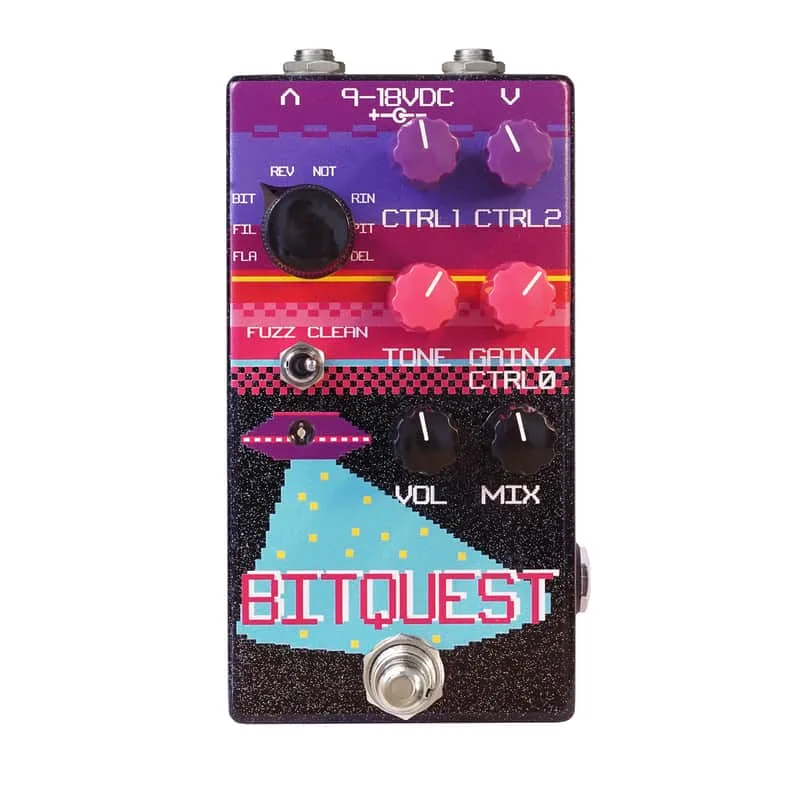


The Dr. Scientist BitQuest Multi-Effect is a mono digital multi-effect pedal that puts eight different effects behind one set of knobs. Pedal of the Day, reviewing it in August 2016, described it as combining "8 different pedals into one, with enough controls to make noises both normal and out of this world." The eight digital effects are Flanger, High-Pass/Low-Pass Filters, Bit Crusher, Reverb, Notch Filter, Ring Modulator, Pitch Shift and Delay1.
The effects and the two modes
A toggle switch selects between two main modes, Clean and Fuzz. In Fuzz Mode the pedal adds a versatile digital distortion to whichever effect is selected, and the CTRL0 knob becomes the gain control. In Clean Mode the fuzz is taken away, and the pedal instead gains an extra control parameter: CTRL0 then controls a parameter that depends on the selected patch1.
The controls
| Control | What it does |
|---|---|
| CTRL0 | In Fuzz Mode this is the gain control; in Clean Mode it controls an effect parameter, depends on patch |
| CTRL1 | Controls an effect parameter, depends on patch |
| Mix | Dry signal only at min, wet signal only at full |
| Treble | +/-15dB peaking filter centerd at 3kHz |
| Vol | Wet signal level |
| Toggle Switch | Selects Clean or Fuzz mode |
The Mix control blends between the dry guitar signal and the processed signal, running from dry only at minimum to wet only at full, which is what lets the BitQuest sit behind an existing sound rather than replace it. Vol sets the level of the wet signal1.
Expression pedal
The BitQuest has a dedicated expression input that controls CTRL0. It takes a TRS connection and expects a 50kΩ expression pedal. Because it drives CTRL0, what the pedal sweeps depends on the mode and patch: in Fuzz Mode it moves the gain, and in Clean Mode it moves the patch's parameter1.
Power
The pedal runs on either 9VDC at 75mA or 18VDC at 150mA, using a 2.1mm center negative plug1.
At 75mA on 9V, the BitQuest draws more current than some daisy-chain supplies comfortably share across several pedals. On 18V it needs 150mA, so a supply with an 18V output is required for that option.
Videos
Knobs
Dr. Scientist Sounds
Dr. Scientist Sounds
Questions
Is the Dr. Scientist BitQuest true bypass?
Yes. The BitQuest uses true bypass, operated by a soft touch switch and a relay, according to Pedal of the Day's review. That means when the pedal is off, your guitar's signal passes through without the digital circuitry loading it, and the soft touch switching gives a quiet, click-free transition between bypassed and engaged.
Can I use an expression pedal with the BitQuest?
Yes. The BitQuest has a dedicated expression input on a TRS jack, and it expects a 50kΩ expression pedal. The expression input controls the CTRL0 parameter, so what it changes depends on the effect patch you have selected. In Fuzz mode, since CTRL0 is the gain control, the pedal can sweep gain from an expression pedal.
What is the difference between Clean and Fuzz mode on the BitQuest?
A toggle switch selects between the two. Fuzz Mode adds what Pedal of the Day describes as a versatile digital distortion to the selected effect, and CTRL0 becomes the gain control. Clean Mode removes the fuzz and instead gives the pedal an extra control parameter, with CTRL0 then controlling a parameter that depends on the selected patch.
Is the BitQuest stereo?
No. The BitQuest operates mono in and mono out, with a single input and a single output. There is no stereo input, no stereo output and no separate dry and wet jacks, so it sits in a signal chain like any other mono pedal.
What does the Treble knob do on the BitQuest?
The Treble control is a peaking EQ filter centred at 3kHz, with a range of plus or minus 15dB. It shapes the tone of the effect signal, letting you cut or boost the upper midrange and treble region around that centre frequency to sit the effect in the mix.
Sources (1)
- Dr. Scientist BitQuest Multi-Effect, Pedal of the Day, 2016-08-15