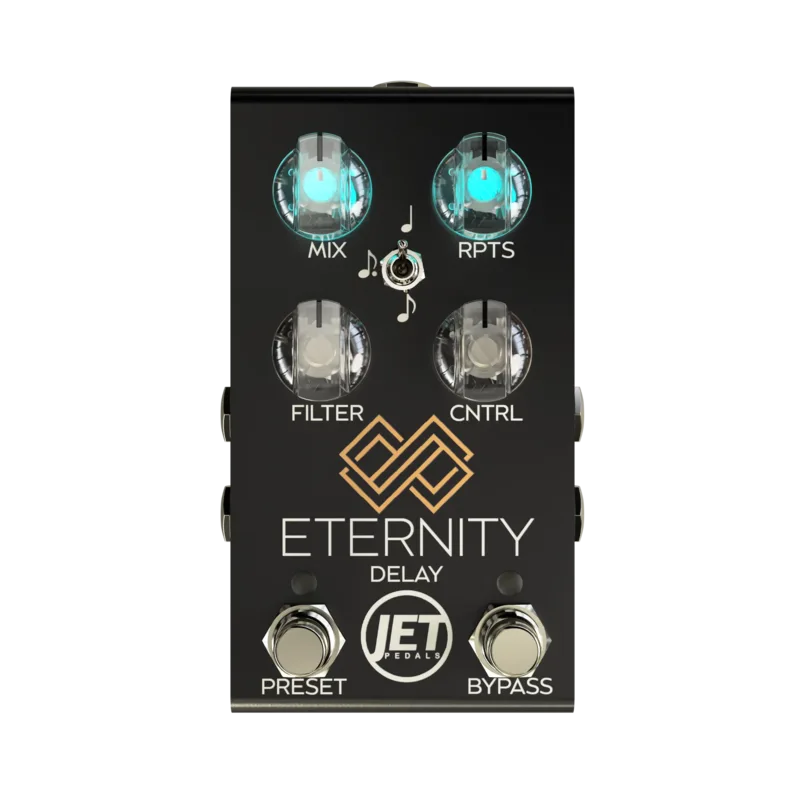


The Eternity Delay is a compact stereo delay pedal from JET Pedals. It offers a range of delay algorithms, from warm, vintage-style Tape repeats with natural modulation and subtle high-end roll-off, to a classic Analog mode with gradual high-frequency decay, plus a multi-functional ESD mode for echo, slapback or doubling, and the JET Signature Slap/Analog Dual delay1. It comes in a pedalboard-friendly enclosure measuring 4.82" x 2.62" x 1.425" and weighing 298 grams1, with two soft-click footswitches for bypass and tap tempo12. JET positions it as "everything you need in a Delay pedal"1.
The pedal comes in Black and White variants at a list price of $249.99, though as of late October 2026 both colors are listed as unavailable on JET's product page, with a restock expected around the end of October1.
Six delay algorithms in one stereo pedal
The Eternity's core is its set of six studio-grade algorithms, each aimed at a different delay style1:
| Algorithm | What JET says it does |
|---|---|
| Tape | Warm, vintage-style repeats with natural modulation and subtle high-end roll-off1 |
| Digital | Pristine, high-fidelity repeats with crystal-clear echoes1 |
| Analog | Classic, warm delay with gradual high-frequency decay for an organic sound1 |
| Dual Delay | Two independent delays running in parallel for complex rhythmic textures1 |
| ESD (Echo / Slap / Doubler) | A multi-functional mode for adding depth, short slapback, or doubling effects1 |
| JET Signature (JRD) | A unique slapback and analog dual delay for rhythm and lead sounds1 |
The two dual-style modes work differently. Premier Guitar's review explains that the dual algorithm combines a customizable analog delay with a fixed dotted-eighth-note digital delay, while the JRD (JET signature rhythm delay) pairs a tweakable analog delay with a tight slapback2. A 2025 update from JET described the JRD as a "Slap & Quarter Note Delay algorithm"4.
The pedal also gained an upgraded tap tempo that averages the BPM based on the number of taps received, which JET says gives extreme accuracy when MIDI clock isn't available. The tap tempo rate LED automatically syncs to the BPM and flashes on the downbeat of each quarter note4. Delicious Audio highlighted this averaging behavior as an interesting innovation when the pedal launched3.
The controls
The Eternity has two soft-click footswitches, one for bypass and one for tap tempo2. The Bypass switch doubles as the main navigation for the pedal1:
- Short press: engages Live Mode
- Double tap: engages Preset Mode
- Two button press: cycles through stored presets
- Long press, 1 second: cycles algorithms
- Long press, 3 seconds: saves the preset1
A selectable subdivision rate switch chooses between quarter, dotted eighth, and eighth note subdivisions1. Of the knobs, the maker documents two in detail: the Repeats knob controls the number of repeats, with fully counter-clockwise giving a single repeat, and at maximum the repeats will not self-oscillate. The Filter knob controls the overall brightness of the repeats and does not affect the dry signal1.
Over MIDI, the knobs can be remote-controlled: CC #20 with values 0 through 127 controls the Repeats knob, and CC #21 controls the Filter knob5.
Power and connections
The Eternity runs on a 9V DC negative tip power supply, which is not included, with a current draw of 250mA1. The 9V jack sits on the right side of the pedal alongside the audio connections2.
At 250mA the Eternity draws more current than a standard 9V battery-style pedal supply, so check that your power brick can deliver it on one output.
For routing, the pedal supports mono in to mono out, mono in to stereo out, stereo in to stereo out, and stereo in summed to mono out, plus a Kill Dry mode. It uses stereo analog dry thru, so the dry signal stays analog rather than being converted1.
MIDI and presets
The pedal holds six onboard presets and, with a MIDI controller connected, up to 127 presets plus remote manipulation of each control12. From the factory it receives MIDI messages on channel 1, and the channel can be changed on startup5:
- Apply power and hold down the Bypass switch while the pedal is in startup mode, as the Mix and Repeats knobs scroll through the color spectrum.
- Release when the LEDs turn a solid color to enter Global settings.
- Rotate the Cntrl1 knob to set the channel, from 1 to 16.
- Hold the Bypass switch to exit and save the setting to permanent memory5.
What reviewers said
Premier Guitar's review found a lot to like, calling it "a powerful pedal with a ridiculous swath of features and full stereo capability," with delay algorithms that "sound brilliant and rich" and original double delay programs that are engaging and rewarding2.
"The JRD, meanwhile, is straight-up grand. It lends so much space and body to chording and single notes alike that it"
The reviewer found the dual algorithm the most fun of the two dual-style modes, producing zany ping-ponging rhythms and encouraging attention to timing and phrasing, and said the pedal "seems to possess a sparkle and three-dimensionality that turns a bedroom into a cathedral"2.
The criticism was about ease of use: fitting all that functionality into a pedalboard-friendly package comes with hard-won compromises in operational ease, and memorizing numerous color codes and varying LED light patterns won't be easy for everyone. The reviewer suggested it is best to test before committing2.
Guitar Pedal X included the Eternity in its roundup of the best new time-based effects pedals of 2023, describing it as a "smart compact 6 Mode Digital Delay"6.
Videos
JET Pedals
JET Pedals
JET Pedals
Questions
How many presets does the JET Eternity Delay hold?
It holds six onboard presets, cycled with a two-button press of the footswitches. With a MIDI controller connected you can program up to 127 presets and remotely manipulate each of the pedal's controls. A long press of one second cycles algorithms, and holding for three seconds saves the current preset.
How do you change the MIDI channel on the Eternity Delay?
From the factory it receives on MIDI channel 1. To change it, hold the Bypass switch while the pedal powers up, keep holding while the Mix and Repeats knobs scroll through the color spectrum, and release when the LEDs turn a solid color to enter Global settings. Rotate the Cntrl1 knob to pick a channel from 1 to 16, then hold Bypass to exit and save.
What is the JRD mode on the JET Eternity Delay?
JRD stands for JET Signature Rhythm Delay, a slap and quarter note delay algorithm. JET describes it as a unique slapback and analog dual delay for rhythm and lead sounds, and Premier Guitar's reviewer found it adds space and body to both chording and single notes.
Does the Eternity Delay work in stereo?
Yes. It has stereo inputs and outputs with stereo analog dry thru, and two input and two output jacks for mono or stereo operation. Routing options include mono in to stereo out, stereo in to stereo out, and stereo in summed to mono out, plus a Kill Dry mode.
Sources (6)
- Eternity Delay, JET Pedals
- JET Pedals Eternity Delay Pedal Review, Premier Guitar, 2023-12-09
- JET Pedals Eternity Delay, Delicious Audio, 2023-08-17
- JET Pedals Releases The Eternity Delay, Premier Guitar, 2023-05-22
- Voes | MIDI-CC, Voes, 2024
- Guitar Pedal X, Guitar Pedal X, 2023-12-20