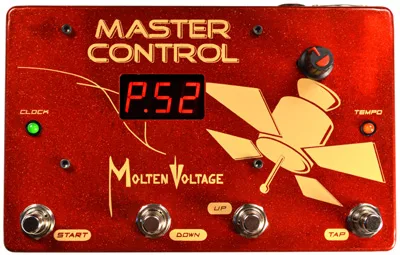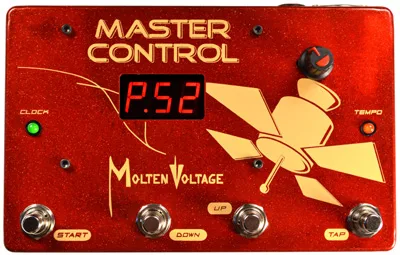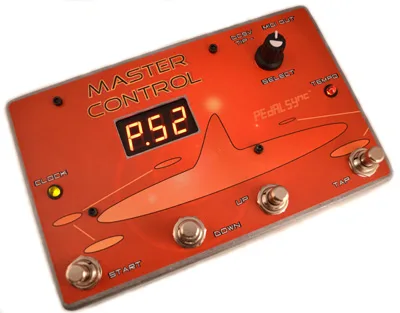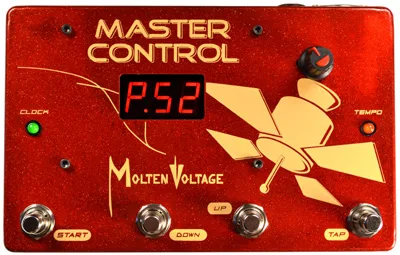
The Molten Voltage Master Control MV-58 is a programmable MIDI pedalboard controller that stores the tempo associated with 128 programs and transmits MIDI Clock to synchronize MIDI-enabled effects1. In plain terms, it sits at the front of a MIDI pedalboard and does two jobs at once: it sends Program Change messages to switch presets on your effects, and it sends a steady MIDI Clock stream so every clock-aware pedal on the board runs its tremolo, delay or sequencer at the same tempo you tapped1.
Molten Voltage lists the MASTER CONTROL MV-58 as discontinued2. The company also built the MASTER CONTROL MV-58B, a related programmable MIDI pedalboard controller with side controllers that stores the tempo for the same 128 programs and transmits MIDI Clock3, and offered the MV-58 as a chip in the PedalSync Master Control KIT for DIY builders4.
What it does for a player
The MV-58 is built around one idea: a program number and a tempo belong together. Each of the 128 program locations stores its own tempo, so calling up a preset also calls up the bpm that preset was written with1. The selected program number shows on a large bright 3-segment LED display, and a CLOCK LED lights whenever MIDI Clock data is being sent over the MIDI OUT jack1.
The MIDI OUT jack carries standard MIDI data over a 5-pin DIN cable, and it also carries Molten Voltage self-programming messages, which cause other compatible Molten Voltage devices to self-program1. That is how the unit acts as the brain of a board built from the company's own Molten MIDI and PedalSync products.
Controls
| Control | What it does |
|---|---|
| TAP button | Sets the tempo; holding it more than 2.5 seconds saves the current tempo at the selected program location1 |
| UP button | Increases the program number by one, or the tempo by one bpm after a tap1 |
| DOWN button | Decreases the program number by one, or the tempo by one bpm after a tap1 |
| SELECT knob | Turns the program number up or down, or the tempo after a tap1 |
| START button | Starts and stops the MIDI Clock output and changes programs; sends MIDI Start or Stop each time the clock is started or stopped1 |
Saving a tempo is a two-step process: tap in the tempo you want, then hold the TAP button for more than 2.5 seconds, and the tempo is stored at the selected program location1.
MIDI channel and factory settings
All MIDI Program Change messages are sent exclusively on MIDI Channel 15, which Molten Voltage calls the primary MIDI channel for its system1. Any effect you want the MV-58 to control has to listen on Channel 15, or sit behind something like the Osmosis MIDI mapper that can reroute the messages.
From the factory, programs 1 through 64 are set to 120 bpm and programs 65 through 128 read "oLd", with the unit on MIDI Channel 151.
Tap tempo range
The tap tempo accepts intervals from 0.25 seconds to 2.5 seconds, giving a range of 24 bpm to 240 bpm1. After a tap, the UP and DOWN buttons and the SELECT knob nudge the tempo in one bpm steps, so you can dial in an exact number after tapping close1.
Firmware versions and Passive and Active modes
MV-58 version 1.08 and later has two modes for selecting programs, Active and Passive1. The manual for the MV-58 covers firmware v 1.091.
- Passive Mode is the default. The program change is sent only when Start is pressed, so you can scroll through programs with the display showing what is coming without your effects changing until you commit1.
- Active Mode sends the MIDI Program Change instantly with each Up or Down press, so each step changes your effects as you go1.
Version 1.08 and later also sends SysEx data that lets SIMI flash the pending program name while you select pending programs in Passive Mode; this is on by default1. Version 1.09 adds the ability to switch between Active and Passive modes in real time during runtime, turned on or off by holding the Down button while powering on; the default is off1.
Older units behave differently. Versions 1.06 and older, manufactured before 10/15/14, also send Song Select data at the same time and at the same value as the Program Change value1. If you are using one of those units with gear that reacts to Song Select, that extra message is part of the deal.
Power and build
The MV-58 takes a separate or isolated 9 volt DC supply with a 2.1mm barrel, tip negative, rated at 100mA minimum, plugged into the DC9V jack1. The same power requirement appears in the MV-58B manual3. Molten Voltage describes the construction as solid and professional grade, including a riveted steel MIDI jack1.
The warranty runs two years from the date of purchase against defects in materials and workmanship, requires an approved power supply and proof of purchase, and is voided by user repair attempts1. Questions go to questions@MoltenVoltage.com and repairs to Service@MoltenVoltage.com1.
Questions
Is the Molten Voltage Master Control MV-58 discontinued?
Yes. Molten Voltage lists the MASTER CONTROL MV-58 as discontinued on its product page. The company also made the MASTER CONTROL MV-58B, a related MIDI pedalboard controller described in its own manual, and offered the MV-58 chip as the PedalSync Master Control KIT for builders.
What MIDI channel does the MV-58 send program changes on?
All MIDI Program Change messages are sent exclusively on MIDI Channel 15, which Molten Voltage calls the primary MIDI channel for its system. That means the effects you want to control need to be set to listen on Channel 15, or routed through a device that can remap the channel.
What tempo range does the MV-58 tap tempo cover?
The tap tempo accepts a maximum tap interval of 2.5 seconds, which works out to 24 bpm, and a minimum tap interval of 0.25 seconds, which works out to 240 bpm. After a tap, the UP and DOWN buttons and the SELECT knob adjust the tempo in steps of one bpm.
What power supply does the Molten Voltage MV-58 need?
It needs a separate or isolated 9 volt DC supply with a 2.1mm barrel, tip negative, rated at 100mA minimum, plugged into the DC9V jack. Molten Voltage specifies an isolated supply, so sharing a non-isolated daisy chain is not what the manual calls for.
How do I save a tempo to a program on the MV-58?
Select the program you want, tap the TAP button to set the tempo, then hold the TAP button for more than 2.5 seconds. The current tempo is saved at the selected program location, and the unit recalls that tempo whenever you return to the program.
Sources (4)
- Master_Control_MV-58_-_PedalBoard_MIDI_Controller_and _Clock_-_Owners_Manual_by_Molten_Voltage.pdf, Molten Voltage, 2015
- MASTER CONTROL .:. MIDI PedalBoard Clock and Brain .:. by Molten Voltage .:. Footswitch Controller to Recall Presets, Molten Voltage
- Master_Control_MV-58B_-_PedalBoard_MIDI_Controller_and _Clock_-_Owners_Manual_by_Molten_Voltage.pdf, Molten Voltage (moltenvoltage.com), 2015
- PedalSync .:. MIDI pedalboard kits .:. by Molten Voltage, Molten Voltage