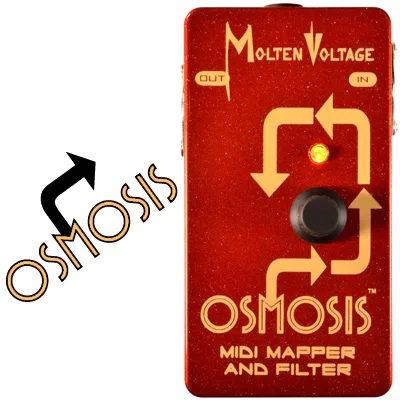


The Molten Voltage OSMOSIS is a MIDI mapper and filter made by Molten Voltage. It sits between your MIDI controller and your other MIDI gear: when an incoming Program Change arrives, OSMOSIS sends out up to five Program Changes in response, one for each of 128 MIDI programs. That lets a single preset on your controller switch several MIDI-equipped pedals or rack units at once, each on its own channel if needed1. Molten Voltage describes it as "a simple-to-use MIDI Mapper and Filter that responds to MIDI Program Changes by sending out up to 5 differen[t]" Program Changes1.
What it does and how it is programmed
Each of the 128 MIDI programs holds its own set of Program Variables, stored separately per program1. Programming is done through a single Knob/Button (E): pressed, it cycles through the variables; turned, it adjusts values; held, it enters Program Copy Mode or Program Edit Mode. Holding the button for 0.5 seconds brings up the message "RELEASE TO COPY", and copying a program to the current location exits after about 2 seconds with the message "CHANGES *SAVED*"1.
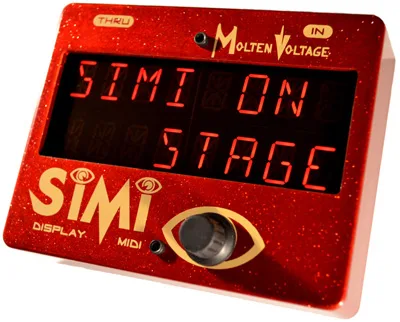
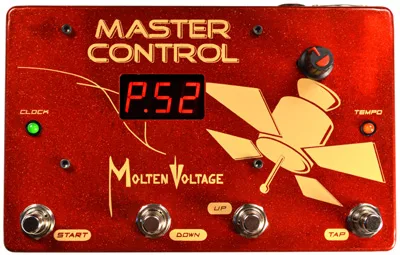
OSMOSIS has no display of its own. It uses Molten Voltage's SIMI as its display for programming, and once programmed it runs independently1. In practice that means the SIMI is a setup tool rather than something the unit needs on every gig.
Controls
| Control | Function | Default |
|---|---|---|
| PC-[A-E] | Sets the value of an outgoing Program Change [A-E]; range 1-128 and OFF; if OFF, no Program Change is sent | - |
| CHAN. | Sets the MIDI channel for an outgoing Program Change [A-E]; range 1-16 and OFF | MIDI Channel 11 |
| PASS PC THRU. | Determines whether incoming Program Changes are passed through | ON (pass incoming Program Changes)1 |
| MIDI RCV CH. | Sets the MIDI channel OSMOSIS responds to; range 1-16 and OMNI | MIDI Channel 151 |
| Knob/Button (E) | Held to enter Program Copy or Edit Mode, pressed to cycle variables, turned to adjust values | - |
All facts in the table come from the owner's manual1.
MIDI filtering
As a filter, OSMOSIS passes most incoming MIDI through while holding back what it does not use. Note On messages are not used by the unit but are generated and passed; Note Off is generated by sending a Note On with velocity 0. Aftertouch, Channel Pressure and Pitch Bend are unused but passed. System Common messages are filtered except Song Select, and of the System Realtime messages, only MIDI Clock, Start, Stop and Continue are passed through1.
Power and connections
The manual specifies a separate or isolated 9 volt, 2.1mm, tip negative (center negative) DC power supply rated at 100mA minimum, plugged into the DC power jack1. MIDI connections are standard 5-pin MIDI cables: a cable from the MIDI OUT jack (A) goes to the MIDI IN jack on your compatible device, and the MIDI IN jack (C) receives from your controller1.
The manual states: "Never power OSMOSIS using a 'daisy chained' power supply that is also connected to audio effects." Use a separate or isolated supply. If the unit clicks or makes noise, the manual's troubleshooting advice is to use a separate or isolated power supply; if it will not turn on, check that you are using a 9 volt DC, 2.1mm tip negative supply; and if it does not respond to Program Changes, set your controller to the same MIDI channel1.
The 100mA minimum draw is worth checking against your isolated supply's per-output rating, since some outputs on multi-output supplies deliver less1.
Construction, versions and warranty
Molten Voltage describes the enclosure as "Solid, Professional-Grade construction, including Riveted Steel MIDI Jacks"1. The manual covers firmware version 1.6; the manual notes that OSMOSIS versions 1.04 and earlier map a single expression controller, so older units behave differently1.
The warranty runs two years from the date of purchase, covering defects in materials and workmanship under normal use with an approved power supply. Proof of purchase is required, and user repair attempts void the warranty. Questions go to questions@MoltenVoltage.com and repairs to Service@MoltenVoltage.com1.
Videos
Step Audio
DoItYourselfMusician
Questions
Does the Molten Voltage OSMOSIS need a display to work?
OSMOSIS uses Molten Voltage's SIMI as its display for programming. Once programmed, OSMOSIS runs independently, so the SIMI is only needed while you are setting up or editing programs. Each of the 128 MIDI programs stores its own Program Variables separately, so after setup the unit responds to incoming Program Changes on its own.
What power supply does the OSMOSIS use?
The manual specifies a separate or isolated 9 volt, 2.1mm, tip negative DC power supply rated at 100mA minimum, plugged into the DC power jack. Molten Voltage also warns never to power OSMOSIS from a daisy chained supply that is also connected to audio effects, since that can introduce clicking or noise.
How many Program Changes can the OSMOSIS send at once?
Up to five. OSMOSIS responds to each of 128 MIDI programs by sending up to five Program Changes, labeled A through E. Each outgoing Program Change can be set to a value from 1 to 128 or to OFF, and if a slot is set to OFF no Program Change is sent on that slot.
What MIDI channel does the OSMOSIS use by default?
OSMOSIS listens on MIDI Channel 15 by default, though the MIDI RCV CH. control can be set to any channel from 1 to 16 or to OMNI. Outgoing Program Changes default to MIDI Channel 1, and each of the five outgoing slots has its own channel setting with a range of 1 to 16 or OFF.
Can I power the OSMOSIS from a daisy chain with my other pedals?
No. The manual states plainly: never power OSMOSIS using a daisy chained power supply that is also connected to audio effects. Use a separate or isolated 9 volt, 2.1mm, tip negative DC supply rated at 100mA minimum. If the unit clicks or makes noise, the manual's remedy is to move it to a separate or isolated supply.
How long is the OSMOSIS warranty?
Molten Voltage warrants the unit for two years from the date of purchase to be free from defects in materials and workmanship under normal use, with an approved power supply. Proof of purchase is required, and user repair attempts void the warranty. Repairs are handled through Service@MoltenVoltage.com.