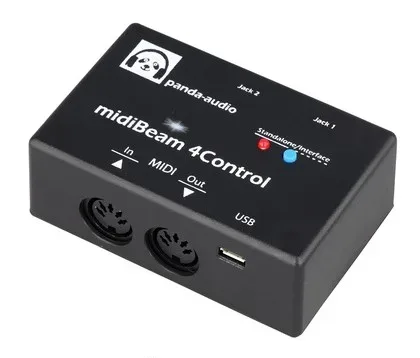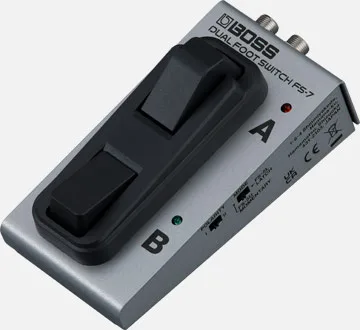

The midiBeam 4Control, made by Panda-Audio Ltd., is a compact box that does two jobs for a MIDI-equipped player. It works as a class-compliant USB-to-MIDI interface between a computer and MIDI gear, and it converts passive TRS expression pedals and footswitches into MIDI messages, so an ordinary pedal can control a synth, a MIDI-controlled overdrive or any other MIDI-capable device1.
It can generate Program Change, Control Change, Note-On/Off, Aftertouch, Pitch Bend and MIDI Start/Stop messages, and each message generator, meaning each pedal or switch, can be set to its own independent MIDI channel1. Panda-Audio positions it as a "USB-MIDI Interface & MIDI Expression/Footswitch Controller"2.
Two modes: Standalone and Interface
The 4Control has two operating modes, and which one you get depends on how it is powered2:
| Mode | How it is selected | LED indication |
|---|---|---|
| Standalone Mode | Powered via the mains | Steadily lit |
| Interface Mode | Powered via a computer's USB port | Blinking |
You can also toggle between the modes manually by quickly pressing and releasing the pushbutton on the top of the device. Pressing and holding that button until the LED blinks rapidly resets the unit to its default settings12.
In Standalone Mode the box works without a computer at all: it sits in a MIDI chain, reading your expression pedals and switches and outputting MIDI through its DIN port. A computer is only needed for Interface Mode, or to run the editor software for setup21.
Connections and what is in the box
On the hardware side the 4Control carries 5-pin DIN MIDI IN and MIDI OUT ports, two TRS stereo jack sockets (6.35mm) for expression pedals or switches, and a class-compliant USB micro-B socket2. You connect your MIDI instruments to the DIN MIDI IN, and the MIDI OUT port feeds the MIDI IN of the device you are controlling1.
Jack 2 has a trick worth knowing: used with a stereo TRS cable and a dual footswitch, Switch A is connected to the tip and Switch B is connected to the ring, so one jack socket handles two independent switches2.
Power comes only through the USB micro B socket, at 5V with a current draw of about 20mA4. There is no battery option, so plan for a USB power source on your board.
In the box you get:
- One midiBeam 4Control unit
- One 50cm USB-A-to-micro-B cable
- One Quick-Start Guide2
The controls and settings
The 4Control is configured through the accompanying PC/Mac Editor software, the 4Control Editor2. The editor's central area has three tabs, GLOBAL, JACK 1 and JACK 2, plus a faux-LCD window showing the current settings of both jacks, LOAD and SAVE preset buttons, a MIDI indicator and an AUDITION button for trying settings as you go2.
The main settings, per the version 1.00 user guide2:
| Setting | What it does |
|---|---|
| MIDI CHANNEL (1...16) | Sets the MIDI channel the expression pedal on the jack transmits on |
| SWITCH A/B FUNCTION | Sets the message type: CONTROL, NOTE ON/OFF, START, STOP, PROGRAM CHANGE, SPECIAL CONTROL or PEDAL |
| SWITCH A/B CONTROLLER (0...127) | Sets which CC number, MIDI note number or PC number is used, depending on the FUNCTION setting |
| SPECIAL CTRL LOWER (0...127) | Sets the CC value sent when a momentary switch is released or a latching switch is off (FUNCTION set to SPECIAL CONTROL) |
| CALIBRATION HIGH END (0.0%...100.0%) | Sets and displays the pedal's upper calibration value at the toe-down position |
| RESET ALL (GLOBAL tab) | Restores the 4Control back to the default setup |
The calibration setting matters for players whose expression pedal does not sweep its full range: you set the toe-down endpoint so the transmitted values match the pedal's actual travel2.
Default setup
Out of the box, all messages are sent on MIDI channel 1. Jack 1's expression pedal sends CC1 (Modulation). On Jack 2, Switch A sends CC67, which the manual notes acts as Program Down on the Future Impact, and Switch B sends CC64 (Sustain)2. That default mapping means the unit is usable immediately with a synth bass setup before any editing.
Where it came from
Panda-Audio Ltd. is based at Széchenyi u. 8, 2040 Budaörs, Hungary2. The midiBeam 4Control's user guide, version 1.00, covers the product's setup and operation2. The company lists the 4Control at €69.003.
Videos
musicmatos TV
Questions
Does the midiBeam 4Control need a computer to work?
No. In Standalone Mode it runs powered from the mains through its USB micro B socket and passes MIDI between your pedals and instruments over its 5-pin DIN ports. Interface Mode, used when it is powered from a computer's USB port, is what you need for USB-MIDI. A computer is only required to run the 4Control Editor software for setup.
Can I use a dual footswitch with the midiBeam 4Control?
Yes. Connect a dual footswitch to Jack 2 with a stereo TRS cable and Switch A is connected to the tip while Switch B is connected to the ring. Each switch can be assigned its own function, controller number and MIDI channel in the editor.
What MIDI messages can the midiBeam 4Control send?
It can generate Program Change, Control Change, Note-On/Off, Aftertouch, Pitch Bend and MIDI Start/Stop messages. Each message generator, meaning each pedal or switch, can be set to its own independent MIDI channel from 1 to 16.
How do I reset the midiBeam 4Control to factory settings?
There are two ways. Press and hold the pushbutton on top of the device until the LED blinks rapidly, which restores the default settings. In the 4Control Editor, the RESET ALL button on the GLOBAL tab also restores the unit back to the default setup.
Sources (4)
- 4Control Quick-Start Guide B, Panda-Audio Ltd., 2026
- 4Control User Manual, Panda-Audio Ltd., 2021-10-08
- Panda Audio, Panda Audio
- Panda Audio, Panda Audio