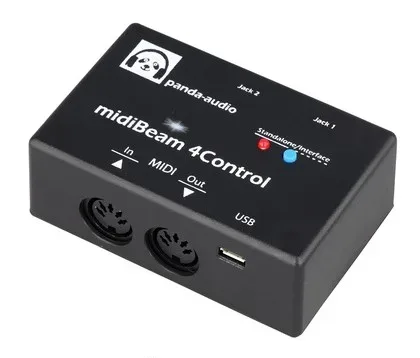

The Panda Audio midiBeam 4Control is a small MIDI utility device that does two jobs in one box. According to the maker's documentation, it "can be used either as a class-compliant USB-to-MIDI interface or as a means to connect passive TRS expression pedals or" switches to MIDI gear1. For a player, that means it can sit between a computer and your MIDI instruments as a simple interface, or it can turn an ordinary expression pedal or footswitch into a MIDI controller for pedals and rack units that accept MIDI commands.
It belongs to the wider family of MIDI pedals and works alongside expression pedals and switching pedals in a rig.
What it does
In its converter role, the midiBeam 4Control generates MIDI messages from a pedal or switch. The maker's documentation states that "midiBeam 4Control allows you to generate any PC, CC, Note-On/Off, Aftertouch, Pitch Bend and MIDI Start/Stop messages"1. In plain terms, that covers the full practical range of what a player normally needs to control remotely: program changes to switch presets on a MIDI-capable pedal, continuous controller messages from an expression pedal, note on and off, aftertouch, pitch bend, and MIDI start and stop for syncing devices such as drum pedals or looping pedals.
The message types it can generate:
Messages can be sent using either a pedal or a switch, and the maximum and minimum values are fully configurable1. That matters when matching a pedal to a receiving device: you can set the range the pedal sends so the far end responds exactly as you want.
Connections and modes
The device carries a DIN MIDI IN for connecting MIDI instruments, a DIN MIDI OUT for sending to a receiving device, two jack sockets for passive TRS expression pedals or switches, and a USB port1.
| Connection | Purpose |
|---|---|
| DIN MIDI IN | Connects to MIDI instruments1 |
| DIN MIDI OUT | Sends MIDI to a receiving device; the maker's example is connecting it to a device's MIDI IN port1 |
| Two jack sockets | Passive TRS expression pedals or switches1 |
| USB port | Class-compliant USB-to-MIDI interface connection1 |
At power-on, the midiBeam 4Control automatically selects one of its two modes, Standalone Mode and Interface Mode1. You can also toggle between them manually by quickly pressing and releasing the button on the top of the device; holding that button until the LED blinks rapidly resets the device to its default state1.
The two modes are chosen automatically at power-on, but you can switch between them yourself with a quick press and release of the top button. A long press, held until the LED blinks rapidly, returns the device to its default state1.
Warranty
Panda Audio backs the device with a limited lifetime warranty covering defective electronic parts or a design fault. In the maker's words1:
"will repair or replace it during the limited lifetime warranty period"
Videos
musicmatos TV
Questions
What is the Panda-Audio midiBeam 4Control?
It is a compact device from Panda Audio that works in two ways: as a class-compliant USB-to-MIDI interface for a computer or device, or as a converter that lets a passive TRS expression pedal or footswitch send MIDI messages. It can generate program change, control change, note-on/off, aftertouch, pitch bend and MIDI start/stop messages, with configurable minimum and maximum values.
Can I use a regular expression pedal with it?
Yes. The midiBeam 4Control has two jack sockets for connecting passive TRS expression pedals or switches. Messages can be sent using either a pedal or a switch, and the maximum and minimum values are fully configurable, so you can match the pedal's travel to whatever range the receiving device expects.
Sources (1)
- 4Control Quick-Start Guide B, Panda-Audio Ltd., 2026