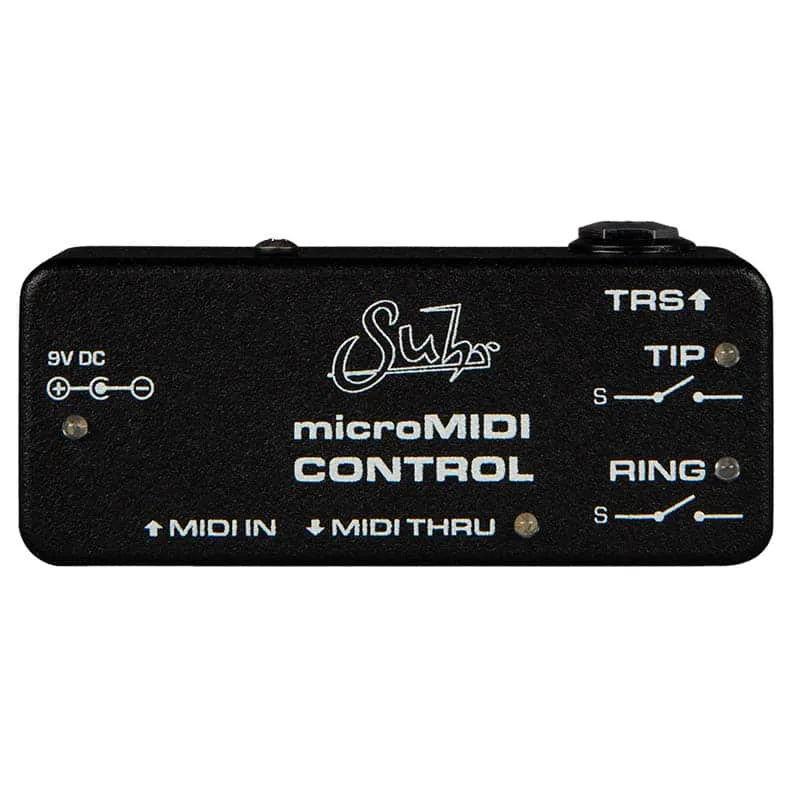
The Suhr microMIDI Control is a MIDI controllable footswitch replacement: a small box that receives MIDI messages and uses them to open and close the tip and ring contacts of a 1/4" output, in place of a mechanical footswitch. Suhr describes it as an alternative to the mechanical footswitches used to control amplifiers, pedals, or any device that has a footswitch input, and it belongs to the wider family of MIDI pedals and switching pedals.1
What it does
The microMIDI Control has two switching contacts, tip and ring, carried on a TRS output jack. Plug in a TRS cable for two-switch devices or a mono (TS) cable for single-switch devices, and run a standard MIDI cable from your controller or pedalboard MIDI hub into the microMIDI. It responds to both Program Change (PC) and Control Change (CC) commands, so it can sit alongside your other MIDI-controlled gear.1
It offers momentary, latching, pulse switching, and predetermined combinations of the two switches. The manual defines the two behaviors players most often ask about1:
"PULSE = CLOSED FOR 50ms, THEN OPEN"
"TOGGLE = Will switch to opposite state of what is currently set."
A blue LED indicator shows the state of the tip switch: on when closed, off when open.1
MIDI channel: setting and default
Every microMIDI is set from the factory to receive messages on MIDI channel 1. If your controller sends on another channel, four internal DIP switches on the bottom of the PCB, reachable when the bottom lid is opened, set any channel from 1 to 16.1
After the MIDI channel is changed, the unit needs to be power cycled to take on the new MIDI channel.1
Program Change map
Twelve Program Change messages give fixed tip and ring states, including toggle and pulse behaviors1:
| PC | Tip | Ring |
|---|---|---|
| 1 | Open | Open |
| 2 | Closed | Open |
| 3 | Closed | Closed |
| 4 | Open | Closed |
| 5 | Open | X (unused) |
| 6 | Closed | X |
| 7 | X | Open |
| 8 | X | Closed |
| 9 | Toggle | X |
| 10 | X | Toggle |
| 11 | Pulse | X |
| 12 | X | Pulse |
Control Change map
Control Change messages give finer control, including any-value commands and timed pulses:
| CC | Behavior |
|---|---|
| 1 to 4 | Any value (0-127) sets tip/ring open or closed combinations |
| 5 | 0-63 tip open, 64-127 tip closed |
| 6 | 0-63 ring open, 64-127 ring closed |
| 7 | Tip toggle (latch) |
| 8 | Ring toggle (latch) |
| 9 | Pulse tip for 50ms |
| 10 | Pulse ring for 50ms |
Power
The microMIDI Control runs on 9VDC center negative through a 2.1mm x 5.5mm barrel connector and draws less than 12mA at 9VDC. The maximum voltage is 12Vdc. That current draw is low enough that a single output of almost any pedalboard power supply can run it, leaving daisy-chain outputs free for other pedals.1
Warranty information is available at www.Suhr.com/Warranty.1
Videos
WisconiMike
Questions
How do I change the MIDI channel on the Suhr microMIDI Control?
Open the bottom lid to reach four internal DIP switches on the bottom of the PCB, and set them to choose any MIDI channel from 1 to 16. After the MIDI channel is changed, the unit needs to be power cycled to take on the new MIDI channel.
What is the default MIDI channel?
All microMIDI units are set from the factory to receive messages on MIDI channel 1. If your MIDI controller sends on a different channel, change the DIP switches inside the unit and power cycle it.
Does the microMIDI Control respond to both Program Change and Control Change?
Yes. It is compatible with Program Change (PC) and Control Change (CC) commands. Twelve Program Change messages map to fixed tip and ring states, while Control Change messages 1 through 10 cover open, closed, toggle and pulse behaviour for the tip and ring contacts.
What is the difference between momentary, latching and pulse switching?
A pulse closes the contact for 50ms and then opens it, which suits amp channel or boost footswitch inputs. A toggle switches to the opposite state of what is currently set, which works like a latching switch. Momentary and predetermined combinations of the two switches are also available.
What power supply does the microMIDI Control need?
It runs on 9VDC center negative through a 2.1mm x 5.5mm barrel connector and draws less than 12mA at 9VDC. The maximum voltage is 12Vdc. Its low current draw means almost any standard pedal power supply output can run it.
Do I need to power cycle it after changing the channel?
Yes. According to the Suhr manual, after the MIDI channel is changed, the unit needs to be power cycled to take on the new MIDI channel.
Sources (1)
- MicroMidi-Manual-August-2020.pdf, Suhr, 2020-08