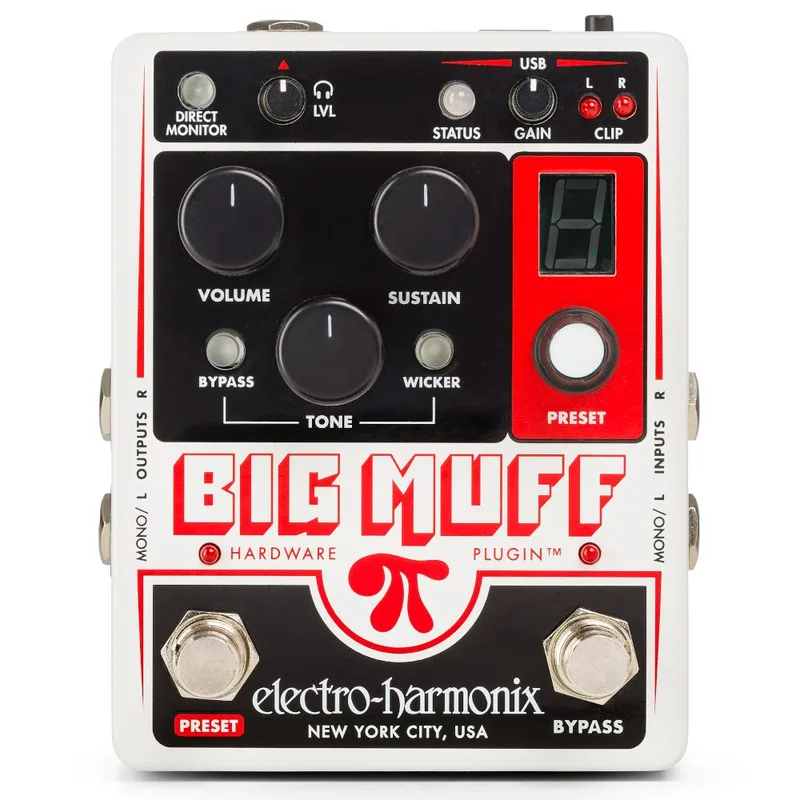


The Big Muff Pi Hardware Plugin is an Electro-Harmonix fuzz pedal with a second life in the studio. On a pedalboard it works like any other Big Muff, but plug it into a computer over USB and it becomes an analog effect running inside your DAW, a 2-in/2-out stereo audio interface, and a reamp box for re-recording direct guitar parts through an external amplifier1. Electro-Harmonix describes it as "True analog distortion plugged directly into your digital audio workstation"2.
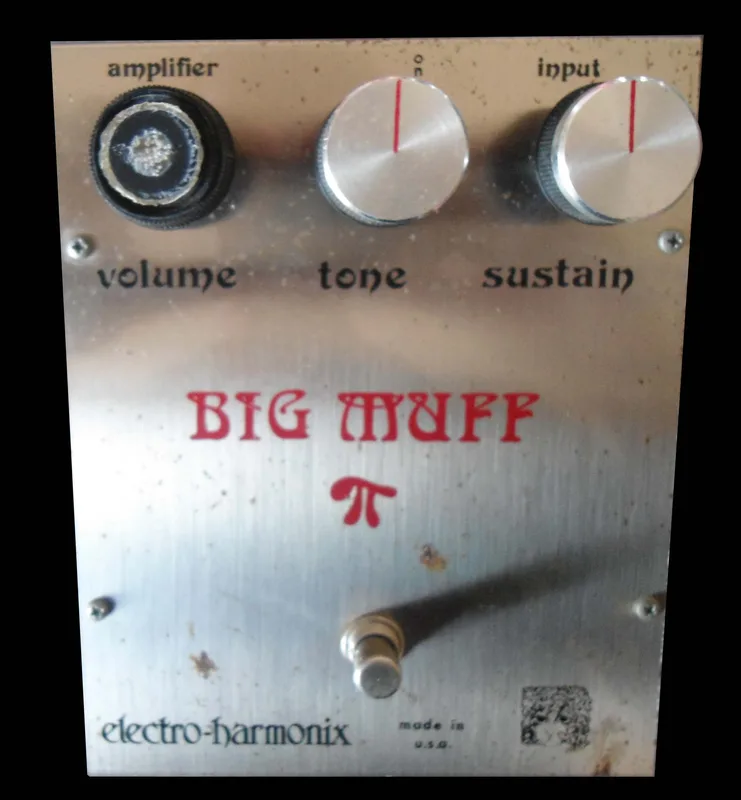
The circuit is the one players keep coming back to: the pedal shares the design of the 1973 Violet Ram's Head Big Muff2, which Sweetwater's Mitch Gallagher called "the most classic of the big muff iterations"1. The guitar signal path is entirely analog, and the audio is never converted to digital inside the pedal itself; the digital side handles control, presets and the USB connection13. It was released in 20222.
What it does
Used standalone into an amp, it functions like any other pedal and delivers what MusicRadar's reviewer described as "that familiar Ram's Head Muff tone - fat, wooly, with huge amounts of fiercely clipped gain on tap"3. Connected to a Mac or PC, it runs as a plugin in any DAW that supports AAX, AU or VST format, such as Pro Tools, Logic or Cubase1. The on-screen plugin duplicates the front panel of the pedal, and all the processing still takes place in the analog domain inside the pedal; the plugin only routes signal in and out and provides control1.
Because the pedal is doing the sonic manipulation rather than the computer, MusicRadar notes one workflow difference from a genuine software plugin: you eventually need to render the audio back into your track in real time3. As an audio interface it operates at sample rates of 44.1 or 48 kilohertz, and it can record with or without the Big Muff effect engaged12. In a DAW you can automate all of the pedal's parameters using the DAW's automation features1.
Out of the box it comes loaded with presets based on classic Big Muff tones, including presets referencing Pink Floyd, The Black Keys and Smashing Pumpkins3.
Controls and features
The pedal carries the three traditional Big Muff knobs plus the switching and studio controls that come with the USB side.
| Control | What it does |
|---|---|
| SUSTAIN | Adjusts the amount of sustain and distortion2 |
| TONE | The classic Big Muff tone control1 |
| VOLUME | Sets output level1 |
| Tone bypass switch | Removes the Muff's tone control from the signal path3 |
| Tone Wicker switch | Extends the high frequency response; bypassed it is the classic wooly Big Muff sound, engaged it gives an open top end3 |
| USB gain controls | Input gain for recording through the pedal and output gain setting the level fed back into it1 |
| HEADPHONE LEVEL | Controls the volume at the rear-panel headphone jack2 |
| DIRECT MONITOR | Sends the signal headed to the ADC to the output jacks and headphone jack for latency-free monitoring23 |
| PANIC button | Resets the USB connection to the computer if the pedal becomes unresponsive to its software plugin2 |
| BYPASS footswitch | Enables or disables the Big Muff effect; LED off means buffered bypass2 |
| PRESET footswitch | Loads or cycles through the 10 presets2 |
On the tone-shaping side, Sweetwater's demo explains the two switches in player terms: the bypass control "bypasses the tone stack it makes the sound a little punchier a little bit bigger a little bit fatter," while the Wicker control "adds high frequency content basically it bypasses three high frequency filters and really opens up the top end of the pedal"1. MusicRadar's reviewer adds that the open top end from the Wicker circuit "purists may not care for, but everyone else will likely appreciate"3.
The pedal stores up to ten footswitch-accessible presets on the pedal itself, and as many as your computer can hold when used in plugin mode23. In the plugin you can store two presets and switch instantly back and forth between preset A and preset B, and transfer presets between the pedal and the computer1.
"The guitar signal path is entirely analogue, but thanks to the digitised controls, this Muff has a memory."
Power and connections
The rear panel carries stereo inputs and outputs plus USB. Both the MONO/L and R inputs are 1/4-inch unbalanced instrument/line-level jacks with 2MΩ input impedance and a maximum allowable signal level of +9.0 dBu; if you use just one input, Electro-Harmonix recommends the MONO/L input2. The MONO/L and R outputs are 1/4-inch unbalanced jacks with a source impedance of about 400Ω2. A 1/4-inch stereo headphone output jack on the rear panel carries both the Left and Right output signals2. The stereo inputs and outputs can be used with keyboards or a stereo guitar rig, not just a single guitar1.
The USB 2.0 Type B port provides both power and a data connection, and the pedal must be connected this way to be used as a Hardware Plugin2. Power can come from the USB cable or from the supplied AC adapter2. The 9V power jack accepts the factory-supplied EHX 9.6DC 200mA adapter, and also Boss and Ibanez style AC adapters capable of delivering at least 150mA2. The pedal draws 120mA at 9VDC with a center negative plug2.
There is no battery option: the pedal runs from the included 9.6VDC adapter or from USB bus power when connected to a computer21.
How it compares
The Hardware Plugin sits in a large family. MusicRadar counts "well over a dozen Big Muff variants available in the Electro-Harmonix catalogue, ranging from Nano-sized to Ram's Head to Tone Wicker, Sovtek, Russian, Germanium, bass versions and more"3, including the Nano Big Muff Pi, the Green Russian Big Muff, the Bass Big Muff and the Germanium 4 Big Muff Pi. What separates this one is the USB audio interface and plugin control rather than a different fuzz voicing.
Guitar World's reviewer, comparing it with Electro-Harmonix's broader Effects Interface, found it "More limited in scope than the Effects Interface, the Muff Hardware Plugin is nevertheless a moderately useful studio tool and a compact grab-and-go pedalboard interface"4.
What reviewers said
MusicRadar's review highlights the studio features: recording input and output gain controls with clip LED indicators, a direct monitoring button for latency-free monitoring, and a headphone volume control3. In Sweetwater's demo video, Mitch Gallagher walked through the pedal's four roles and came away positive:
"I've really been impressed by this pedal not only does it give you all those great big muff pie Distortion sounds for your guitar but being able to use it in your mixes in your dock really opens up a lot of creative possibilities"
In the same demo Gallagher noted that no matter what signal you process with it, "you get that thick Rich smooth overdrive and Distortion that you can blend in to match exactly the sound that you want to achieve," and that it can be used as an insert or on a send in your DAW1.
Videos
EHX
MusicGearz
Questions
What is the Big Muff π Hardware Plugin?
It is an Electro-Harmonix fuzz pedal based on the 1973 Violet Ram's Head Big Muff circuit that also connects to a computer over USB. Inside a DAW it works like a plugin, but all the distortion processing happens in the pedal's analog circuit rather than in software. It also works as a 2-in/2-out stereo USB audio interface and a reamp box, and it functions as a normal standalone Big Muff on a pedalboard.
Sources (4)
- Electro-Harmonix Big Muff Pi Hardware Plug-in Effects Pedal & USB Interface, Sweetwater, 2022-11-30
- Big Muff Pi Hardware Plugin, Electro-Harmonix (www.ehx.com)
- Electro Harmonix Big Muff Pi Hardware Plugin pedal review, MusicRadar, 2023-01-06
- Electro-Harmonix Effects Interface review, Guitar World, 2026-03-12