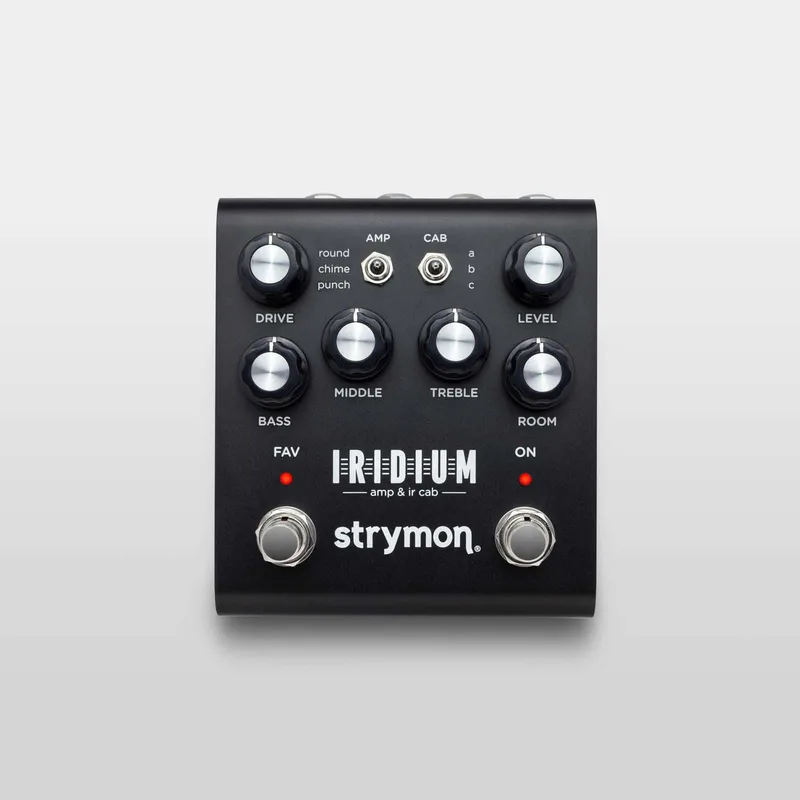


The Strymon Iridium is an amp modeler and speaker cabinet simulator in a pedal, built to sit at the end of a pedalboard and replace an amp for headphones, recording or going straight to a PA. It models three classic tube amplifier circuits and pairs them with nine stereo impulse response speaker cabinets, plus a room ambience control for a sense of space. Strymon describes it as an amp modeler solution in a pedal format that you can drop into any pedalboard1.
It launched in 2019 at $3992. A retailer lists it at $399.99 USD as of October 20263. The signal path is digital amp and cab processing behind an analog front end: a stereo high impedance discrete JFET preamp with up to 22dB of pure analog gain, with a SHARC DSP doing the modeling4.
What the Iridium does: three amps, cab IRs and room
The Iridium gives you three amp models, each paired with a choice of three cab IRs, plus a ROOM knob that controls natural room ambience with a secondary function to toggle between small, medium and large room sizes4. The cab IRs run at full stereo 24bit 96kHz resolution for their entire 500 milliseconds5. Strymon curated the nine factory IRs from vendors Cabir.eu, Celestion, Ownhammer and Valhallir.at5.
The ROOM knob's three sizes let you dial in anything from a tight recording booth feel to a larger space, and the ambience sits after the IR cabinet in the internal routing46.
The amp models: Round, Chime and Punch
Each amp model is based on a specific classic circuit, and each has its own character as Strymon describes it4:
| Amp | Based on | Strymon's description |
|---|---|---|
| Round | Fender Deluxe Reverb (Normal channel) | Clean, bright, and mid-scooped, with plenty of headroom |
| Chime | Vox AC30TB (Brilliant channel) | Jangly, bright, and chimey, providing air for subtle passages with a light touch, and bite when you want to dig in |
| Punch | Marshall Plexi (Super Lead model number 1959) | Meatier, with higher gain than the other two amps, and a powerful midrange response |
The MIDDLE knob behaves differently per amp: on Round and Punch it adjusts the tone stack to highlight middle frequencies, while on Chime it rolls off high frequencies as you turn it up, acting like the AC30's Tone Cut control47. On Chime, a frequency-shaped front end boost is added at the top end of the Drive range7.
The nine factory cabs cover Fender, Vox, Marshall and Mesa/Boogie configurations8:
- 1x12 Fender Deluxe Reverb (OwnHammer impulse of a vintage Deluxe Reverb 1x12 open back combo with a 1978 Fender CTS ceramic 12 inch speaker)48
- 1x12 Fender Blues Junior (cabIR impulse, Jensen C12N speaker)48
- 2x10 Fender Vibrolux (cabIR impulse, 1965 Vibrolux with Jensen C10NS speakers)48
- 2x12 Vox AC30-6 open back fawn8
- 1x12 Custom cab with Celestion Blue Alnico8
- 4x12 Mesa/Boogie Half-Back8
- 4x12 Marshall with Celestion G12M-25s8
- 2x12 Custom cab with Celestion Vintage 30s8
- 8x12 Marshall with Celestion T652s8
The CAB knob selects one of three complementary cabs for each amp type, and each cab contains two IRs, left and right, which can be replaced using Strymon's Impulse Manager software4.
Controls and connections
The front panel keeps things simple: DRIVE, BASS, MIDDLE and LEVEL knobs, a CAB knob, a ROOM knob, and two footswitches, ON and FAV. The FAV footswitch recalls a stored Favorite setting including all knob and switch settings; press and hold until the FAV LED blinks to save a new Favorite4.
| Control | What it does |
|---|---|
| DRIVE | Sets the amount of gain from the modeled amp |
| BASS | Adjusts the tone stack to highlight low frequencies |
| MIDDLE | Highlights middle frequencies (Round, Punch) or rolls off highs (Chime) |
| LEVEL | Sets output volume, also adjusts headphone volume |
| CAB | Selects one of three cabs per amp type; each cab holds two IRs |
| ROOM | Controls room ambience level; secondary function toggles small, medium or large room |
| ON footswitch | Activates amp, cab and room processing |
| FAV footswitch | Recalls or saves a Favorite preset |
The input is a single jack that works with mono or stereo TRS input signals depending on the Input Selector switch on the back, set to MONO, STEREO or SUM. Input impedance is 1 Meg Ohm, and the pedal accepts instrument level (-10dB) or line level (+4dB) signals up to +8dBu9. The input level mode is changed by pressing and holding the FAV footswitch while connecting power until both LEDs blink, then using the DRIVE knob to select, with GREEN for instrument level and RED for line level9.
Output is stereo via LEFT and RIGHT jacks (use OUT L for mono), with a stereo 1/8 inch headphone output whose volume is set by the LEVEL knob4. Output level runs from instrument up to line level, adjustable by the LEVEL knob and a Level Trim secondary function that boosts or attenuates output without affecting the leveling between stored presets10.
Power and connections: 9V, 500mA
The Iridium runs on 9V DC center negative, and Strymon's product page specifies a minimum of 500mA, with the power supply not included4. The current requirement depends on how you use it:
- Headphone output not in use: Strymon recommends at least 300mA1
- Headphone output in use: Strymon recommends at least 500mA1
The 500mA minimum rules out most battery supplies and many low-current daisy chains. Plan a dedicated 9V center negative output on your pedalboard power supply.
For headphones, Strymon recommends an impedance between 25 to 70 ohms and sensitivity as close to 100dB/mW as you can get1. Like most guitar pedals, the Iridium receives its ground connection via the 1/4 inch output jacks, so when listening through headphones with a wall adapter and nothing plugged into the outputs, some hum can appear. Strymon says the hum can be eliminated by connecting LEFT or RIGHT OUT to the input of an amplifier with an earth ground connection, which does not need to be powered on, or by grounding the guitar via the strings1.
Strymon also notes that in some setups, using a DI may help if you encounter noise or ground loops when connecting the Iridium's outputs directly to a PA or mixer11. The buffered signal, engaged or bypassed, can handle sending signals over long cable runs11.
Presets, MIDI and expression
The Iridium stores one Favorite preset on the pedal itself, accessible from the FAV footswitch4. Add a MultiSwitch Plus and you get four footswitchable presets at your feet4. Connect a MIDI device through the EXP jack and you get full MIDI control with remote parameter control and access to 300 preset locations, which requires a Strymon MIDI EXP cable or a MIDI to TRS interface4.
The EXP/MIDI jack is a multi-function communication jack. A standard TRS expression pedal can act as a volume pedal before the amp, and the jack also accepts a Strymon MiniSwitch, MultiSwitch Plus or MIDI EXP cable4. The volume pedal mode can be set to Volume PRE, placed right before the amp modeling, or Volume POST, placed right after the IR cabinet but before the room ambience6.
Firmware updates and factory reset
Firmware is loaded through the USB jack on the back, which is also used to load IR files from a computer4. The current firmware release is Rev 1.33, released November 2024, which adds compatibility with Nixie 2.0 and must be updated via Nixie 2.2.012. Strymon has also released firmware updates for Iridium addressing minor issues and adding requested new features13. A factory reset clears out and restores all factory presets, expression pedal assignments, secondary functions, customized IR cabs, and power up modes: press and hold the ON footswitch while connecting power to the pedal, release the footswitch once both LEDs flash, then follow the knob turns, Turn 1 AMBER, Turn 2 RED, Turn 3 AMBER14.
To load third-party IRs, connect the powered pedal to your computer with the included USB-mini cable and use the Strymon Impulse Manager software15. IRs must be mono or stereo 24 bit 96 kHz .wav files up to 500ms in length; files that do not meet this criteria are rejected by the software16.
A factory reset clears factory presets, expression pedal assignments, secondary functions, customized IR cabs and power up modes14. The procedure:
- Press and hold the ON footswitch while connecting power to the pedal14
- Sweep the MIDDLE knob from 0% to 100% twice; status shows on both LEDs14
- Watch the knob turns: Turn 1 AMBER, Turn 2 RED, Turn 3 AMBER, Turn 4 both LEDs blink RED as the pedal resets and power cycles14
- Once both LEDs flash, release the footswitch; when the ON LED lights up RED after the power cycle, the pedal is ready to use again14
Where it came from and what reviewers said
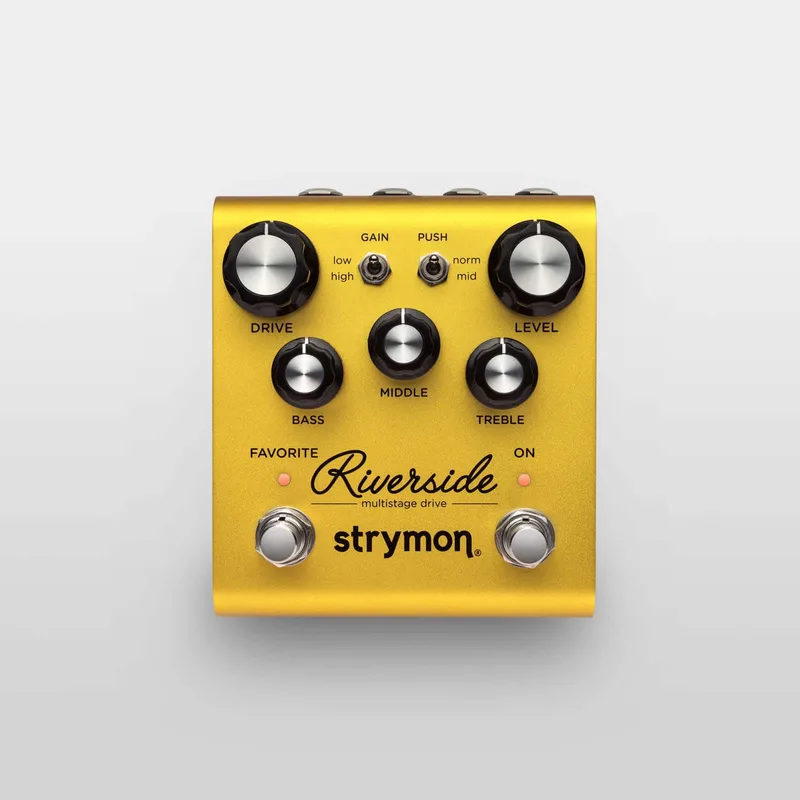
Strymon announced the Iridium on October 23, 2019, priced at $3992. Its development began while Strymon was working on the tube and cascading gain emulation created for the Riverside, and the Iridium shares the Riverside's knob organization, with the exception of a Room control on the bottom right7. Inside, a 32-bit floating-point SHARC ADSP-21375 processor works with an ARM co-processor to deliver the 24-bit 96kHz 500ms impulse responses17.
The Iridium carries a list price of $399.99 USD, in a pedal format measuring 12 × 6 × 4 in3. Strymon designed it as an amp modeler solution in a pedal format that you can drop into any pedalboard1, with a strong and lightweight anodized black aluminum chassis, designed and built in the USA1.
"Three good-sounding amp emulations lay the foundation for a truly impressive bundle of functionality in a very compact package."18
Videos
Rhett Shull
Andertons Music Co
Sweetwater
Questions
Is the Strymon Iridium true bypass?
No. The Iridium uses what Strymon calls Transparent Analog Buffered Bypass. The buffered signal can handle sending signals over long cable runs whether the pedal is engaged or bypassed, so it behaves like a buffer in your chain at all times.
Can you use the Strymon Iridium with headphones?
Yes. It has a stereo 1/8 inch headphone output with a LEVEL knob for volume. Strymon recommends headphones with an impedance between 25 to 70 ohms and sensitivity as close to 100dB/mW as possible, and supplying at least 500mA when the headphone output is in use.
How do you load third-party IRs into the Iridium?
Connect the powered pedal to your computer with the included USB-mini cable and use the Strymon Impulse Manager software. IRs must be mono or stereo 24 bit 96 kHz .wav files up to 500ms in length; files that do not meet this criteria are rejected by the software.
Can the Strymon Iridium be used for bass?
The Iridium's three amp models are based on classic guitar amps: a Fender Deluxe Reverb, a Vox AC30TB and a Marshall Plexi. Strymon does not present it as a bass amp modeler, and players looking for bass-specific cab simulation may want to compare it with dedicated bass units.
Why does my Iridium hum through headphones?
Like most guitar pedals, the Iridium receives its ground connection via the 1/4 inch output jacks. When listening through headphones with a wall adapter, there is no earth ground, so some hum can appear. Strymon says the hum can be eliminated by connecting LEFT or RIGHT OUT to the input of an amplifier with an earth ground connection, which does not need to be powered on.
Can you record directly into an interface with the Iridium?
Yes. Strymon describes connecting the Iridium's stereo outputs to a recording interface to capture ideas directly. Its output level is adjustable from instrument up to line level using the LEVEL knob and the Level Trim secondary function.
Sources (18)
- Using Iridium's Headphone Output, Strymon, 2026-06-17
- Strymon's new pedal is the Iridium floor-based amp modeller and cab sim, Guitar.com, 2019-10-23
- Strymon Iridium, West Coast Pedal Board (westcoastpedalboard.com)
- Iridium Amp Modeler And Cab, Strymon, 2026-02-19
- What is Iridium?, Strymon, 2021-07-19
- How to set the EXP jack to Volume Pedal mode on Iridium, Strymon, 2021-07-19
- Strymon Iridium Amp & IR Cab, Delicious Audio, 2021-06-14
- Strymon Iridium review, MusicRadar, 2020-02-10
- How do you connect to Iridium?, Strymon, 2021-07-19
- What is Iridium's output level?, www.strymon.net, 2025-12-01
- Do I need to use a DI with Iridium?, Strymon, 2021-07-19
- Iridium Firmware Revision Release Notes, Strymon, 2024-11-19
- New Firmware Is Here!, Strymon, 2023-11-10
- How do I perform a factory reset on Iridium?, Strymon, 2021-07-19
- Connecting Iridium to the Strymon Impulse Manager Software, Strymon, 2021-07-26
- What kind of IR files can I load to Iridium?, Strymon, 2021-07-26
- Review: Strymon Iridium, guitar.com, 2020-03-10
- Strymon Iridium Amp and IR Cab Pedal Review, GuitarPlayer (www.guitarplayer.com), 2022-03-14