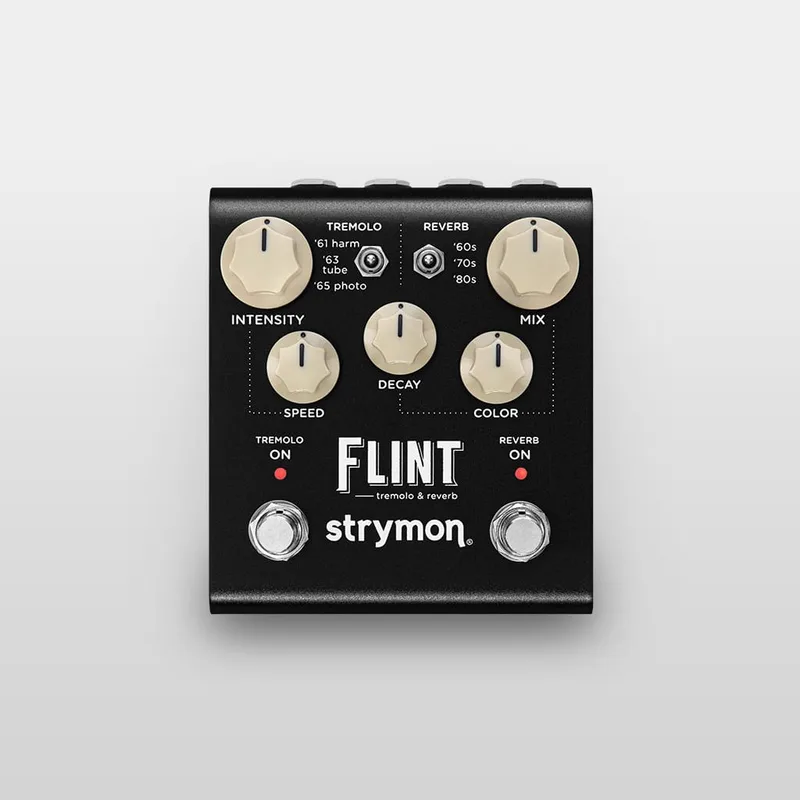


The Strymon Flint is a digital pedal that puts tremolo and reverb in one box: tremolo on one half of the panel, reverb on the other, each with its own footswitch so you can run them together or one at a time. Strymon describes it as "essentially two pedals in one" and as a studio-class effects pedal that delivers "the history of tremolo and reverb in a pedalboard friendly format"1. The current version, the Flint V2, lists at a price of $349.001.
The three tremolo types are the '61 Harmonic Tremolo, the '63 Power Tube Tremolo and the '65 Photocell Tremolo; the three reverb types are '60s Spring Tank Reverb, '70s Electronic Plate Reverb and '80s Hall Rack Reverb1. The '61 mode is based on the harmonic tremolo circuits of early 1960s tube amplifiers, a dual-band filtering effect that alternately emphasizes low and high frequencies, with shades of a mild phaser combined with tremolo1.
The controls and hidden settings
The panel splits in two. On the tremolo side you get a bypass footswitch, a three-way voice toggle, and Intensity and Speed knobs; the reverb side has its own bypass switch, another three-way toggle, and Mix, Decay and Color parameters2. The tremolo footswitch's LED indicates tremolo speed1. The Reverb (Decay) knob varies reverb time, and the '70s and '80s reverbs approach "infinite" decay at maximum1.
Guitar World's review notes that there are secondary controls hidden away, including Pre-Delay, Tap Division, and Boost/Cut, accessed by pressing and holding both footswitches or by engaging Live Edit mode by holding a single switch2. On the Color control, the reviewer found it gives a darker vibe when bumped, affecting the decays with a break-up that filters out musically2.
Several global settings live in a setup mode rather than on the panel:
- Input level: hold the REVERB ON footswitch while powering up, release once both LEDs flash, then turn the INTENSITY knob. Instrument mode (green, the default) is set for guitar or bass level; Line mode (red) is set for line level sources such as a keyboard or synthesizer and adds 10dB of headroom. Press either footswitch to store4.
- Bypass mode: hold the REVERB ON footswitch while powering up, then turn the MIX knob. True Bypass shows green, Buffered Bypass red. Press either footswitch to store5.
- EXP/MIDI jack mode: hold the TREMOLO ON footswitch while powering up, release once both LEDs flash, turn the MIX knob to choose a mode, then press either footswitch to store6.
Power and connections
The V2 runs on 9V DC, center negative, with a minimum of 300mA, and the power supply is not included1. Guitar World lists the same rating2. The original Flint required 250mA minimum at the same 9V center negative7, so an older power setup sized for the original may not have headroom for the V2.
The 300mA minimum draw rules out a battery and means the V2 needs a dedicated or isolated power output, not a shared daisy chain output sized for small analog pedals.
Connections are a 1/4" stereo/mono input and L and R stereo outputs2. The input is a high impedance, ultra low-noise, discrete Class A JFET preamp, and a TRS adapter cable is required for a stereo input signal; use Out L for mono output1. The V2 has full stereo in/out with a rear panel switch for stereo (TRS) or mono (TS) input18. The original Flint also did stereo, but by flipping an internal jumper and using a TRS splitter cable, and it shipped in mono configuration from the factory79. The V2 also has a USB-C jack on the back for controlling the pedal via MIDI and for firmware updates1.
MIDI, presets and the EXP/MIDI jack
The V2 has full MIDI implementation through the EXP/MIDI jack or the USB-C connection, so you can control just about every switch, knob and setting remotely, and tremolo speed can be synchronized via MIDI Clock Sync with the sync setting saved per preset1. There are 300 MIDI preset locations for loading and saving settings1. Guitar World notes there are no onboard preset slots: the presets are saved and recalled using an external MIDI controller2.
The EXP/MIDI jack itself is multifunction. In setup mode you choose one of four functions, each shown by the LED color6:
| Mode | LED | What it does |
|---|---|---|
| Expression Pedal | Green (default) | Continuous control over any of the knobs with a standard TRS expression pedal |
| Favorite | Amber | Recall a Favorite setting using a Strymon MiniSwitch |
| Tap | Red | Set tremolo speed via tap tempo using a Strymon MiniSwitch |
| MIDI | Blue | Select three presets using a Strymon MultiSwitch Plus |
For tap tempo, connect an external switch with a TRS cable to the EXP/MIDI jack and tap in a tempo to set the tremolo speed10. With a MultiSwitch Plus connected in MIDI mode, you can save the pedal's current state: hold the TREMOLO footswitch until both LEDs blink green, then press the A, B or C footswitch on the MultiSwitch Plus to save to that location11. Full MIDI functionality is also available by sending MIDI Program Change messages through a 1/4" TRS MIDI connection using a Strymon Conduit or MIDI EXP cable6.
Firmware updates are done with Strymon's Update software: connect the powered pedal to a computer with a USB-C cable, and the software detects it automatically and shows "Your device is up to date" when finished12. The current release is firmware REV 1.21, from November 2024, which added Nixie 2.0 compatibility; an earlier revision, v1.19 from September 2023, added MIDI CC# 25 for Clock Division13.
The original Flint and the V2
The original Flint ran on a SHARC DSP with 32-bit floating point processing, 24-bit 96kHz converters, and had an analog dry path when reverb only was engaged7. It won a Guitar Player Editors' Pick award, with the magazine's February 2013 review citing its small size, stereo outs, expression pedal input, three reverbs and "a wonderfully voiced analog front-end"14.
The V2, released in 202015, keeps the same core effects algorithms, with hardware differences around them2. Guitar.com's review notes that Strymon claims to have done nothing with the core sounds of the original Flint16. What changed is around the edges: a new ARM DSP chip, a 520MHz ARM Superscalar processor with 32-bit floating point processing, MIDI, the 300 presets, full stereo with a rear panel switch, and the line level input mode with its 10dB of added headroom for basses with active pickups, synthesizers, keyboards and effects loops18. Premier Guitar's coverage of the updated line described the new version as having full stereo inputs and outputs with a rear panel Mono/Stereo switch8.
If you own an original Flint, the V2 features cannot be added to it. Strymon states that the electronic and mechanical designs are different and the hardware is not interchangeable17.
The V2 measures 4.5" deep x 4" wide x 2.4" tall (101.6mm x 114.3mm x 44.5mm), weighs 1.1lbs (0.5kg), and sits in a strong, lightweight anodized black aluminum chassis12.
What reviewers said
Guitar World's verdict on the V2 was emphatic:
"Still the reverb/tremolo pedal to beat, the Flint V2 updates an already world-beating two-in-one that has little to prove"2
MusicRadar's review of the original Flint concluded it was "a handy tool that covers plenty of ground"18. Delicious Audio called it "a thorough (and incredibly successful) stereo exploration of vintage spring reverb and tremolo tones"15, and Pedal of the Day said the V2 "brings all the sonic glory of the original into focus, along with a slew of new upgrades"19.
Players have used it on real boards. Pete Thorn demonstrated it in Strymon's own demo video2021, and Harrison Whitford told Strymon he had kept one on his pedalboard for about six years: "I've had the Flint for about six years and it's never left my pedalboard, and I don't think I've played a gig or session" without it21.
Videos
ProGuitarShopDemos
Pete Thorn
strymon
Questions
Is the Strymon Flint true bypass?
Yes. From the factory, both the original Flint and the V2 ship in true bypass, and on the V2 it is an electromechanical relay switched true bypass that leaves the signal untouched when the pedal is off. You can switch it to buffered bypass in the setup menu, and plugging into the right output jack automatically selects buffered bypass.
Can the Strymon Flint run in stereo?
Yes. The V2 has full stereo input and output, with a rear panel switch for stereo TRS or mono TS input and low impedance dual TS outputs. The original Flint also offered stereo operation, but through an internal jumper and a TRS splitter cable rather than a rear switch, and it shipped in mono configuration from the factory.
Does the Strymon Flint come with a power supply?
No. Strymon lists the V2's power requirement as 9V DC, center negative, 300mA minimum, and states that the power supply is not included. You need a supply or an isolated output on your pedalboard power unit that meets that rating.
Can I use the Strymon Flint with a bass or synth?
Yes. The default Instrument input mode is set for instrument level sources such as a guitar or a bass. Switching to Line mode adds 10dB of headroom, which Strymon says allows use with basses with active pickups, synthesizers, keyboards and effects loops.
Sources (21)
- Flint V2 Tremolo & Reverb, Strymon (www.strymon.net), 2026-09-02
- Strymon Flint Tremolo & Reverb V2 review, Guitar World, 2026-09-16
- Catalinbread Tremol8: a modern take on the oldest pair of effects, Guitar.com, 2023-08-14
- How do I set the Input Level on Flint?, Strymon
- How do I change the bypass mode on Flint?, Strymon
- How do I configure the EXP/ MIDI jack on Flint?, Strymon, 2026
- Flint Brochure, Strymon (www.strymon.net), 2023-12-05
- Strymon Announces Updated Line of Six Popular Pedals, Premier Guitar, 2022-06-28
- How do I enable the TRS stereo input on Flint?, Strymon, 2022-05-07
- How do I use a tap switch with Flint?, Strymon
- How do I use MultiSwitch Plus with Flint?, Strymon, 2025-06-12
- How can I update the firmware on Flint v2?, Strymon, 2026-07-09
- Flint v2 Firmware Revision Release Notes, Strymon, 2024
- Flint Tremolo & Reverb receives the Guitar Player Editors' Pick award!, Strymon (www.strymon.net), 2013-03-12
- Strymon Flint V2 Tremolo + Spring Reverb, Delicious Audio, 2023-10-25
- Strymon Flint V2 review, Guitar.com, 2023-01-09
- Can I send in my old pedal to get the V2 features added?, Strymon
- Strymon Flint review, MusicRadar, 2015-10-11
- Strymon Flint Tremolo & Reverb V2, Pedal of the Day (pedal-of-the-day.com), 2022-11-21
- Pete Thorn's Flint Tremolo & Reverb demo video, Strymon, 2013-02-20
- Artist Feature: Harrison Whitford, Strymon (www.strymon.net), 2021-05-07
 Rich Robinson